Define dependencies between Tasks - Table
|
Task planning in the Schedule > Define dependencies between Tasks > Define dependencies between Tasks - Table |
In the table view, there are various options for defining dependencies between tasks.
FS relationship:
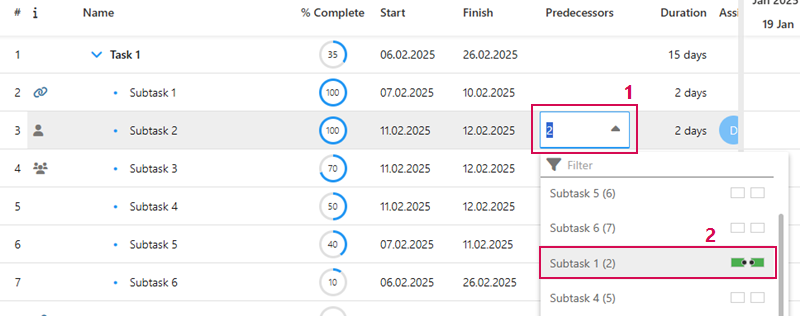
➢Select the task to which you want to assign a predecessor (e.g. Subtask 2).
➢Double-click in the cell in the Predecessor column. (1)
➢Click on the down arrow. ▶ The drop-down menu opens.
➢In the drop-down menu, click on the task that you want to define as the predecessor (e.g. Subtask 1). (2)
➢Click outside the menu to exit.
➢The two tasks are linked with a finish-to-start relationship.
▶ Subtask 2 only starts when subtask 1 has been completed.
Or
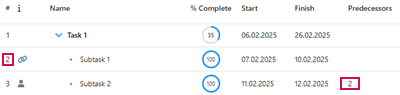
➢Enter the number of the task to be assigned as the predecessor in the Predecessor column.
Define SS, FF and SF relationship:
To define the other dependencies, proceed as follows:
➢Select the task to which you want to assign a dependency to another task.
➢Double-click in the Predecessor column.
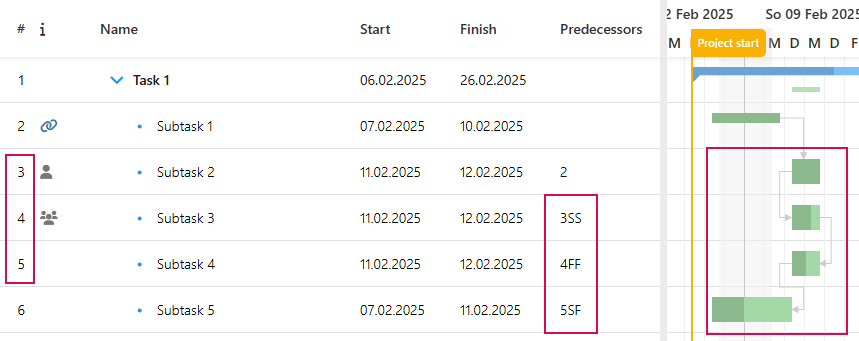
➢Enter the number of the operation that you want to relate to the current task and enter the dependency SS, FF or SF.
▶ The two tasks are linked to the desired dependency.
▶ Alternatively, you can show the Successor column and define the subsequent task as described above.