Project Estimates
In this section you will find an overview of the project budget and schedule:
➢%Completed: Progress of the entire project in percent.
▶ This field is updated automatically. The progress is calculated on the Schedule tab. (see Progress Indicator)
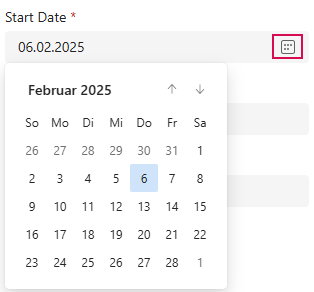
➢Start Date: Start date of a project
➢Click on the calendar icon and select the start date in the calendar.
▪Finish Date: Estimated end date of the entire project. End of the last task in the project plan.
▶ This field is updated automatically. The end date is calculated on the Schedule tab. (see Define Duration of Task)
▪Total Budget: Total financial framework available for the project.
▪Total Forecast: Current estimate of the total cost of the project.
▪Total Actual: Actual costs incurred up to a certain point in time.
▶ Budgets are entered on the Finances tab.
| Recalculate Total Budget, Total Forecast and Total Actual: |
➢Click on the calculator icon (1). The Recalculate button appears.
➢Click on Recalculate. (2)
▶ The value is recalculated.
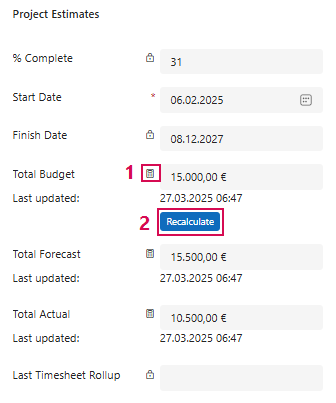
▪Last Timesheet Rollup: Last summary of the time confirmations of all project members. This field is updated automatically.
▶ Data records can be found under Timesheets. (see Navigation Bar)