Add Objectives
To add an Objective, proceed as follows:
➢Click on New Objective. ▶ The Quick Create: Objective form for creating an Objective opens.

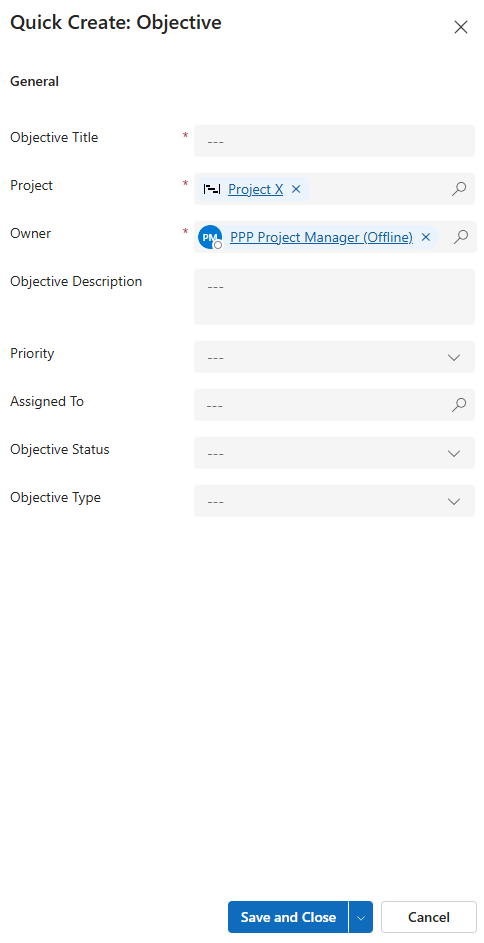
▪Fill out the form:
▶ To add an Objective, the mandatory fields must be filled out. All mandatory fields are marked with a red star.
▪General:
▪Objective Title: Enter a meaningful name for the Objective.
▪Project: The current project is selected by default.
▪Owner: Creator of the Objective. The current user is entered by default.
▶ You can select a different project and owner by clicking on the search icon (magnifying glass) and selecting a different project or owner from the drop-down menu.
▪Objective Description:
➢Enter meaningful descriptions in the field.
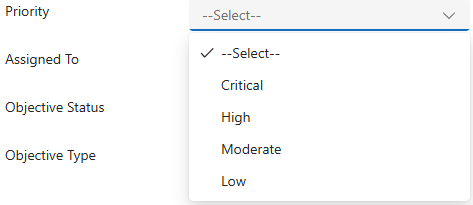
▪Priority:
➢Click in the field and select the priority from the drop-down menu..
▪Assigned To: Stakeholder to whom the Objective is assigned.
➢Click on the input field, then press the Enter key and enter the desired stakeholder.
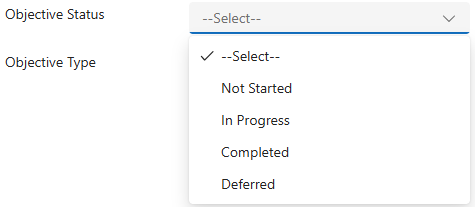
▪Objective Status:
➢Click in the field and select the status from the drop-down menu.
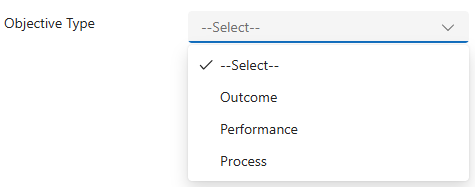
▪Objective Type:
➢Click in the field and select the type from the drop-down menu.
➢Click Save and Close.
Or
➢Click the down arrow and Save & Create New to add another Objective.

▶ A Objective is added.
▶ The Objective appears in the Active Objectives table.