Further Commands for Status Updates
Above the table, you can perform additional commands for status updates:
➢Click on the 3 dots above the left side of the table. ▶ A dropdown menu opens.
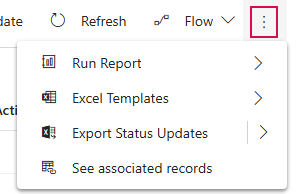
▶ If you have selected a status update, the dropdown menu contains additional commands related to the selected status update.
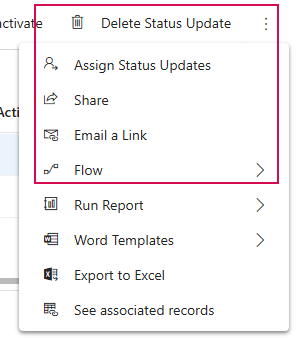
➢Select the desired command:
▪Delete Status Update: delete the selected status update. The action cannot be undone.
▪Assign Status Update: change the owner of the status update.
▪Share: share these status update with selected people or teams. Ownership is not changed.
▪Email a Link: send a link via Email to the selected records.
▪Flow: run a flow for this status update.
▪Run Report: select a report to run.
▪Word Templates: generate Word documents or new templates.
▪Export to Excel: export the selected records to data to a static Excel worksheet
▪See associated records: shows records associated with this view.