Define Scheduling Mode
|
Task planning in the Schedule > Task Attributes > Define Scheduling Mode |
When scheduling a task in the TPG Scheduler, the work is calculated from 3 variables: Duration, Units and Effort. This means:
Work = Duration * Units * Effort
In order to plan a task realistically, there are 3 planning modes that can be defined for a task in the TPG Scheduler. One variable is defined for each planning mode:
▪Fixed Duration = duration of the task remains constant.
▪Fixed Units = number of assigned resources remains constant.
▪Fixed Effort = number of working hours/days remains constant.
Define scheduling mode:
➢Show the Scheduling Mode column. (see Schedule - Table)
➢Click in the Scheduling Mode cell during the task. ▶ The drop-down menu opens.
➢Click on the desired scheduling mode Fixed Duration, Fixed Units or Fixed Effort.
▶ The desired scheduling mode is defined for the task.
▶ The default setting for the scheduling mode is Fixed Duration.
▶ As soon as a resource is assigned to a task, the TPG Scheduler calculates an effort of 8 hours per day and resource.
If a scheduling mode (e.g. Fixed Duration) is selected, the other variable (e.g. Units) is recalculated when one variable (e.g. Effort) is changed. The variables are related as follows:

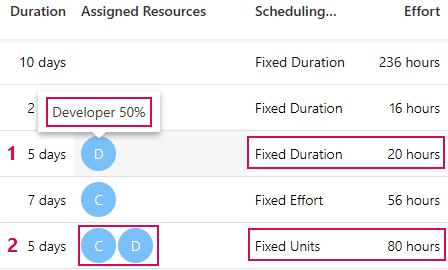
Example 1: Fixed Duration (5 days): Change of Effort (20 hours) leads to recalculation of Units (Assigned Resource: Developer 50%).
Example 2: Fixed Units (number of Assigned Resource): Change of Units (1 ⭢ 2) leads to recalculation of Effort (80 hours)
Example 3: Fixed Effort (56 hours): Change of Duration (10 days) leads to recalculation of Units (Assigned resource: Consultant 70%).