Status Report
The Status Report tab provides a central overview of the current status of the current project. All relevant reports and key figures are bundled here so that you can keep track of progress and potential challenges at all times.
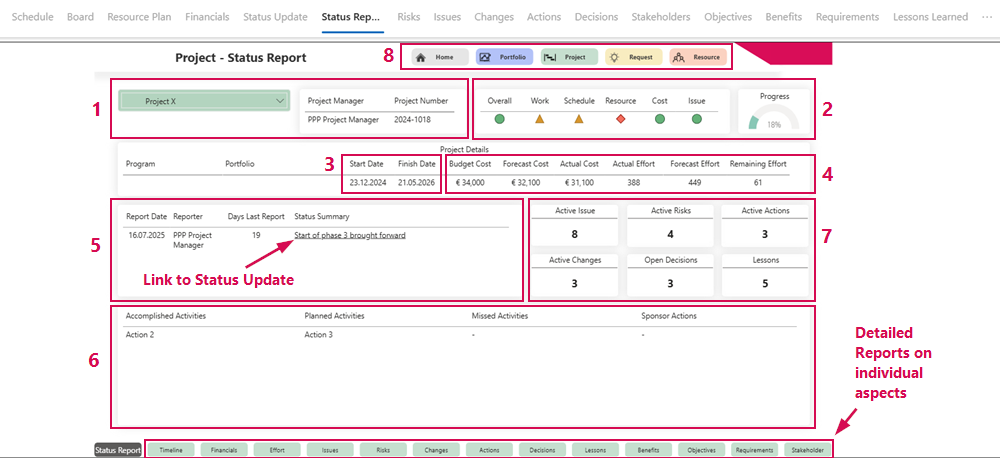
On the start page of this tab, you will find the most important information about the current project, such as:
▪Project Name, Project Manager, and Project Number (1)
▪Progress of the entire project and traffic light display (red, yellow, green) for the individual Project KPIs (2)
▪Project start and end dates (3)
▪Cost development (4)
▪Information and link to the last Status Update (5)
▪Actions from the last Status Update and their implementation status (6)
▪Number of active Issues, Risks, Changes, Actions, open Decisions, and Lessons (7)
▪Links to the home page and other reports: Portfolio, Request, Resource (8)
In addition to the Home page, the Status Report tab contains additional sub-tabs with detailed reports on individual aspects of the project:
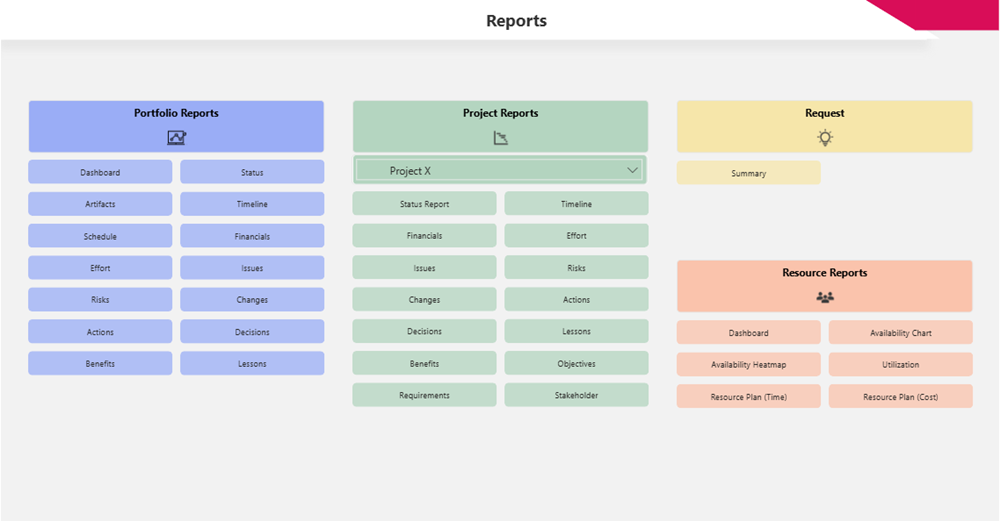
▶ You will find links to all reports on the Home page.
▶ The language of the reports is set centrally. It is not possible to change the language via the Personalization Settings. Available languages: English and German.