Additional Commands for Risks
|
Risks > Additional Commands for Risks |
Above the All Risks table, there are additional commands that you can use:
➢Click on the three dots to the left above the table. ▶ A drop-down menu will open.
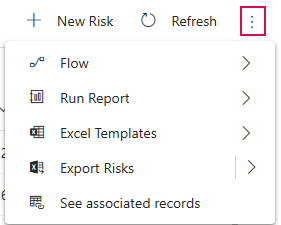
▶ If you have selected a Risk, additional commands related to the selected Risk will appear in the drop-down menu:
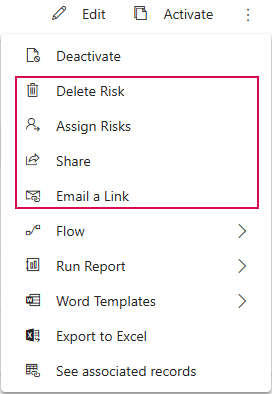
➢Select the desired command:
▪Delete Risk: Permanently deletes the selected Risk.
⚠ This action cannot be undone.
▪Assign Risks: Changes the owner of the selected Risk.
▪Share: Shares the Risk with selected individuals or teams without changing ownership.
▪Email a Link: Sends a link to the selected Risk via email.
▪Flow: Runs a flow for the Risk.
▪Run Report: Select a report to run.
▪Word Templates: Creates Word documents and templates.
▪Export to Excel: Exports the data to a static or dynamic Excel worksheet or to an Excel pivot table.
▪See associated records: Shows records associated with this view.