Define Duration of Task
|
Task planning in the Schedule > Define Duration of Task |
You can define the duration of a process in the Duration column. The duration is specified in days. By default, the duration of a newly created task is 1 day.
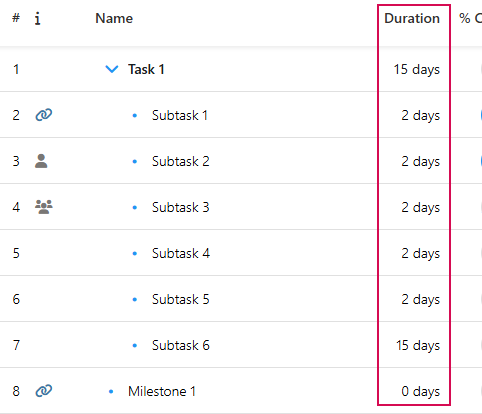
➢Select the task for which you want to set the duration.
➢Double-click the cell in the Duration column. ▶ You can now enter text in the cell.
➢Enter the estimated duration in days.
▶ The duration of a summary task is calculated automatically as soon as the dependency is defined (see Define dependencies between Tasks).
▶ The end date of the task in the Finish column is calculated automatically.
By default, the duration is specified in the unit “days”. You can specify the duration of a task in a different unit. The following units are supported:
Unit |
Abbreviation |
|---|---|
day |
d |
week |
w |
year |
y |
Change unit for duration:
➢Select the task for which you want to change the unit of duration.
➢Double-click on the cell in the Duration column. ▶ Text can now be entered in the cell.
➢Enter the expected duration in weeks (w) or years (y).
▶ You can enter the unit or the abbreviation.