Navigation Bar
The navigation bar is located on the left side of the user interface. Depending on the section, you'll find different navigation options. There are 3 sections:
Enterprise:
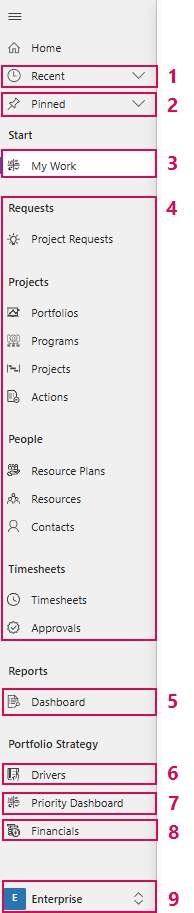
The navigation bar offers the following navigation options in the Enterprise section:
▪Drop-down menu with the most recently viewed pages (1)
▪Drop-down menu with the bookmarked pages (2)
▪Start:
▪My work: direct access to your current actions, projects, etc. (3)
▪Links to the lists with existing data records (4)
▪Reports:
▪Dashboard: graphical overview of all projects, portfolios and programs (5)
▪Link to drivers for project applications and projects (6)
▪Project priorities: Graphical overview of drivers and project priorities (7)
▪Listing of financial data (8)
▪Switch to Settings and About (9)
Settings:
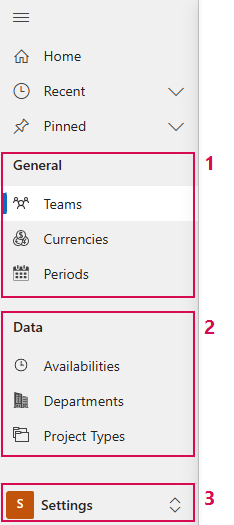
The navigation bar offers the following navigation options in the Settings section:
▪General: (1)
▪Teams: Add and manage teams.
▪Currencies: Add and manage currencies.
▪Periods: Add and manage time periods based on calendar weeks.
▪Data: (2)
▪Availabilities: Add and manage calendars for working hours and non-working hours.
▪Departments: Add and manage departments.
▪Project Types: Add and manage project types.
▪Switch to the Enterprise and About sections (3)
About:
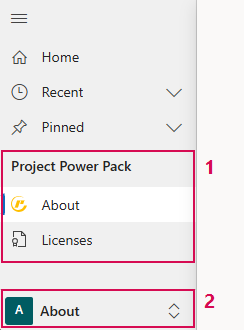
The navigation bar offers the following navigation options in the About section:
▪Project Power Pack: (1)
▪About: View product information
▪Licenses: Add and manage licenses
▪Switch to Enterprise and Settings sections (2)