Automatically share a project with team members
When a project team member is added, the corresponding project is automatically shared with that person so that they can view and edit it in the Scheduler.
When a task is assigned to a person, they automatically receive write access to that item so they can edit and update it.
Sharing Mechanisms
PPP uses two different mechanisms for automatic sharing:
1. Project Approval via Access Teams
Process:
1.A project team member is added (see Project Team Tab - Assembly project team manually), modified, or removed.
2.The system identifies the associated project and searches for an access team named “Team Member [Project Name].” If no such team exists, it is automatically created.
3.The access team is assigned the following permissions for the project:
▪Read
▪Append
▪Append To
4.Next, all project team members with the “Contribute” permission (not “None”) are identified and synchronized with the access team:
▪New members are added.
▪Removed members are removed.
▪Members with the “None” permission are also removed.
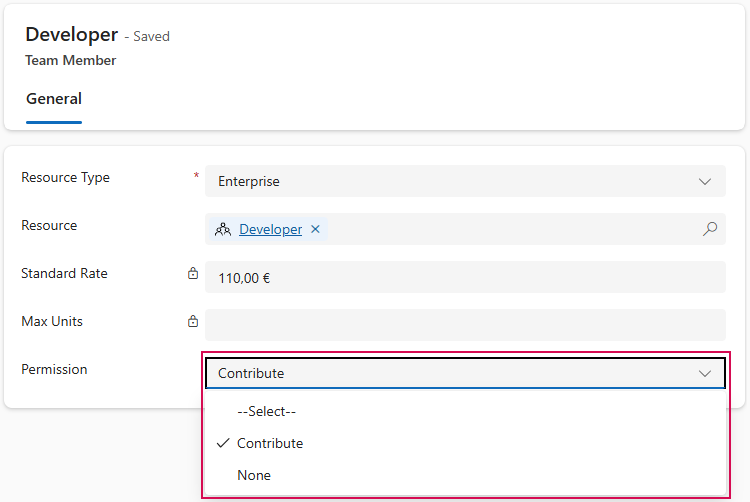
▶ The access team functions as a dynamic, automatically synchronized user group. All users included in it inherit the defined project permissions.
2. Approval of Actions (Direct User Approval)
Process:
1.When an action is created, the user specified in the “Assigned to” field (see Edit Actions) is automatically granted write access.
2.If the task is assigned to another person, the new assignee receives the following permissions:
▪Read
▪Write
▪Attach
▪Append to
Access is revoked from the previously assigned user (unless they are the owner of the record; owners always retain access).
3.No access team is used for tasks; access is granted directly to the respective user.
Summary:
▪Access is granted automatically whenever a task is created, modified, or deleted.
▪Access management is handled dynamically and without manual intervention.
▪Permissions can be controlled at the level of individual team members (e.g., via “Contribute” or “None”).
▪The approval of tasks is handled by a separate mechanism.
▶ Existing Data: Existing entries are automatically set to the “Contribute” permission during the next deployment. Manual adjustment is not required.
▶ Tasks: Assigned users can edit their tasks without additional approvals. Upon reassignment, access rights are automatically transferred.