Additional Commands for Objectives
Above the Active Objektives table, there are additional commands that you can use:
➢Click on the three dots to the left above the table. ▶ A drop-down menu will open.
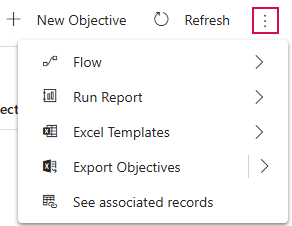
▶ If you have selected an Objective, additional commands related to the selected Objective will appear in the drop-down menu:
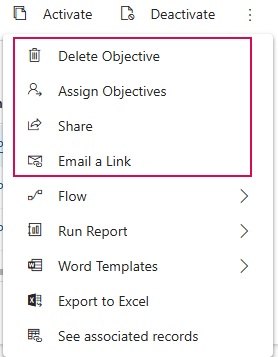
➢Select the desired command:
▪Delete Objective: Permanently deletes the selected Objective.
⚠ This action cannot be undone.
▪Assign Objectives: Changes the owner of the selected Objective.
▪Share: Shares the Objective with selected individuals or teams without changing ownership.
▪Email a Link: Sends a link to the selected Objective via email.
▪Flow: Runs a flow for the Objective.
▪Run Report: Select a report to run.
▪Word Templates: Creates Word documents and templates.
▪Export to Excel: Exports the data to a static or dynamic Excel worksheet or to an Excel pivot table.
▪See associated records: Shows records associated with this view.