Define dependencies between Tasks - Information Window
|
Task planning in the Schedule > Define dependencies between Tasks > Define dependencies between Tasks - Information Window |
In the Task information window, you can change the dependency types and insert a lag between two tasks.
There are 2 ways to open the Task information window.
➢In the table, click on the task you want to edit.
➢Click on Edit. ▶ The Task information window opens.
Or:
➢Double-click on the task bar in the Gantt chart. ▶ The Task information window opens.
➢Click on the Predecessor or Successor tab - depending on the relationship you want to edit.
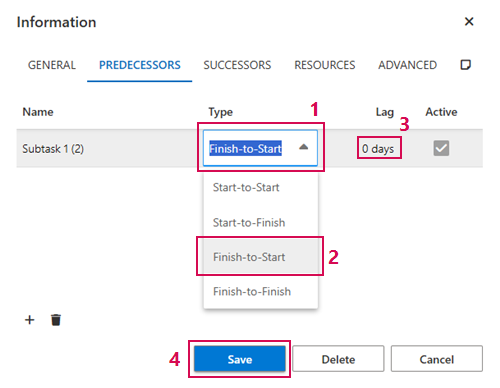
➢Click on the Type field. (1) ▶ The drop-down menu opens.
➢Click on the desired dependency. (2)
➢Click on the Lag field. (3)
➢Enter the number of days.
➢Click on Save. (4)
▶ The dependency between two tasks is changed and a lag is inserted.
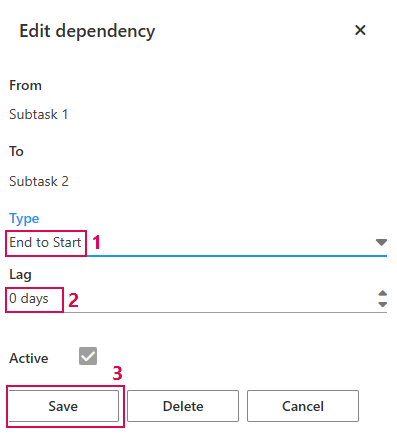
Dependencies between tasks can also be changed via the Edit dependency window.
➢Double-click on the dependency arrow in the Gantt chart. ▶ The Edit dependency window opens.
➢Click on the Type field. (1) ▶ The drop-down menu opens.
➢Click on the desired dependency.
➢Click on the Lag field. (2)
➢Enter the number of days.
➢Click on Save. (3)
▶ The dependency between two tasks is changed and a lag is inserted.