Action Item Column
|
Configure Settings for Content Pages > TPG Scheduler Configuration > Action Item Column |
This feature creates an additional column that tracks open and completed tasks. This provides a quick status overview, better project control, and early detection of open tasks.
➢Check or uncheck the Enable action item column checkbox.

View in the schedule:
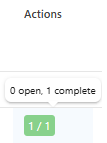
▶ When enabled, the column is automatically added to the view.
Complete the configuration:
➢Click Submit at the very bottom to apply the settings.