Custom Assignment Grid Columns
|
Configure Settings for Content Pages > TPG Scheduler Configuration > Custom Assignment Grid Columns |
This setting allows you to display additional fields in the Scheduler’s Resource and Assignment views. For example, you can display effort, utilization, or user-defined fields directly in the Scheduler.
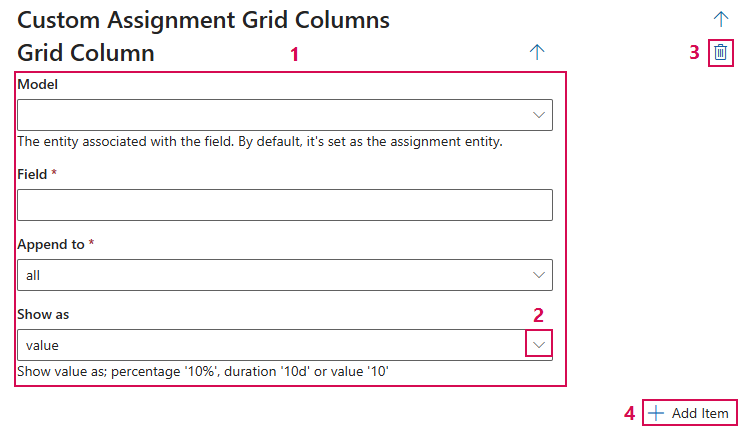
➢Click Add Item to add a column. ▶ The input fields appear.

Configure Column
▶ All required fields are marked with a red asterisk.
Enter the following information: (1)
▪Model: Specifies whether the field comes from the Assignment or Resource entity.
▪Field: Name of the field to be displayed.
▪Append To: Determines the area in which the column is displayed.
▪Show as: Specifies how the value is displayed.
The following display formats are available: (2)
➢Value: Displays the value (e.g., 10)
➢Percentage: Displays as a percentage (e.g., 10%)
➢Duration: Displays as a duration (e.g., 10d)
Additional editing options:
➢Click the Delete icon to delete a field. (3)
➢Click Add Item to add a field. (4)
Complete the configuration:
➢Click Submit at the very bottom to apply the settings.