Navigation Bar
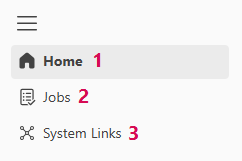
The navigation bar is located on the left side of the user interface. Depending on the content area, the navigation bar offers the following navigation options:
Operations:
▪Home: Home Page (1)
▪Jobs: Running, Controlling, and Monitoring Jobs (2)
▪System Links: Adding Links to Systems (3)
Settings: (only for Tenant Admins)
➢Click the gear icon in the header bar to go to the Settings section.

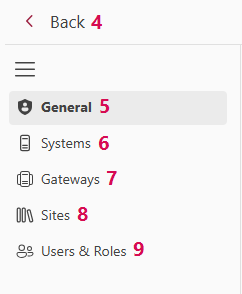
The following navigation areas are available here:
▪Back: Navigate back to Operations. (4)
▪General: List and details of all Tenant Administrators. (5)
▪Systems: Overview of connected systems. (6)
▪Gateways: Overview of gateways in use. (7)
▪Sites: List, add, and edit all sites. (8)
▪Users & Roles: List of all users by role. (9)
▶ Click the three horizontal lines  to expand or collapse the navigation bar. When collapsed, more space is available for the content area.