Version 9.2.0.0
|
Release Notes TPG PSLink 2022 > Version 9.2.0.0 |
System connectivity and authentication
SQL Server
We enhanced configuration with resiliency options and added support for the following SQL Server features:
•Always On Availability Groups
•Always On Failover Cluster Instances
•Always Encrypted
•Always Encrypted with secure enclaves
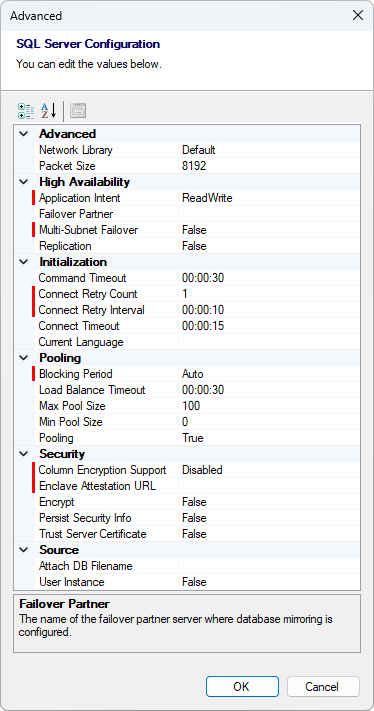
The full list of added SQL Server connection configuration options is:
•Initialization
oConnectRetryCount
oConnectRetryInterval
•Pooling
oPoolBlockingPeriod
•High Availability
oApplicationIntent
oMultiSubnetFailover
•Security
oColumnEncryptionSetting
oEnclaveAttestationUrl
And this is how the Advanced settings dialog looks now, with the newly added options highlighted:
ODBC and other ADO.NET providers (generic database support)
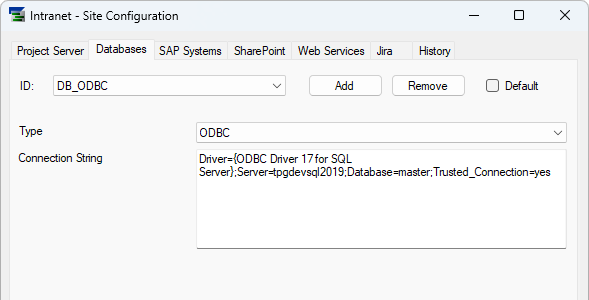
On the Databases tab, there is now a dropdown that allows you to select the database provider. Built-in and therefore always available are:
•SQL Server
•ODBC
•OLE DB
•Oracle
But the really nice thing is that this list is dynamic! When you install any ADO.NET Data Provider, like e.g. the SAP Hana ADO.NET Provider, it shows up in this list and you can use it to connect to pretty much any database you want. As we cannot know all ADO.NET Data Providers, we require you to enter the respective Connection String with all the details.
There is one caveat though: These database connections are only available in QueryDatabase. All other PSLink features like History, Cache Tables, and actions like SaveTableToSql do still only support SQL Server, nothing else.
We want to encourage everyone who used the connectionString configuration option of QueryDatabase to move to this new approach as it is more generic and much more secure. However, we do keep the old approach (which was limited to OLE DB) around, so don't worry.
➤ If you try to use such a non-SQL Server database in a context that requires a SQL Server connection, you'll see the following error message:
Requested connection to SQL Server, but the Database system is configured for a different database type.
Atlassian Jira OAuth Authentication
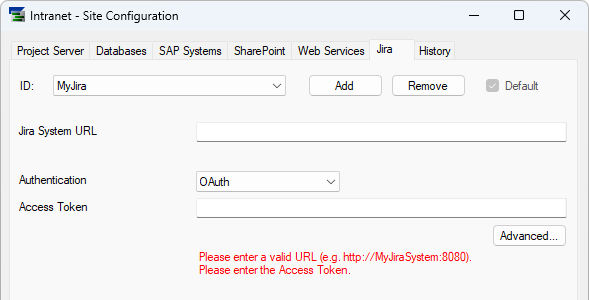
We added support for OAuth authentication when connecting to Atlassian Jira. As there is no easy way to retrieve OAuth tokens for Jira programmatically, we opted to let you paste a token in Site Configuration:
Microsoft Project add-in login fix
Due to historic reasons our Microsoft Project add-in searched for the user in SharePoint or Project Server by name instead of by account. That obviously falls down when the user names are not unique. We have finally addressed that old login issue and are now always searching for the user by account.
Project Server actions
Last month, Microsoft again enhanced the implementation of Project Server Subscription Edition to allow modification of a tasks' FixedCostAccrual property. In other words, it's now possible to set task cost accrual to the task start or task finish, or to have costs prorated over the task's duration.
We've followed suit and support this in PSLink now.
➤ If you try to use this and your Project Server instance does not support it yet because its patch level is too low, you'll see an error message like the following:
The field FixedCostAccrual is read-only on task <your task's name> (<your task's GUID>), because modification is not supported yet by Project Server. Upgrade to a newer version (or install a more recent CU) to enable modification.You have version <your server's current version> installed, minimum required version is <minimum required version to use the feature>.