Work Interface and Views
When you open TPG PortfolioManager, the Scenario tab is opened by default. All functions of TPG PortfolioManager are on the Scenario, Projects and Resources tabs. Changing the tab will change the menu bar, not the page content.
The Browse and Page tabs belong to SharePoint and are not used for TPG PortfolioManager.
There are two views for planning which can be accessed via the buttons in the Views group of the Scenario tab:
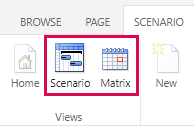
Scenario: Main view for your work: Analysing the resource situation, shifting projects and resource assignments to optimize the resource utilization
Matrix: Assignment of resources to projects in a matrix view
The data can be edited independently of other scenarios: Editing projects or resources that are also stored in other scenarios has no mutual effect.