Replacing or adding resources
|
Planning Procedure > Commitments and Updates > Replacing or adding resources |
If a task was planned with a generic resource or if the requested resource is not available, the team manager may assign a new resource to the project. In this case, the new resource will automatically be listed in the Matrix view.
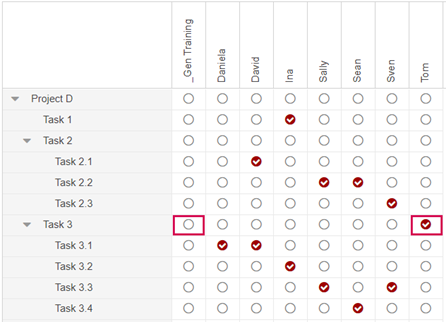
In the example below, Tom has been assigned to the project to replace the generic resource of team Training. The project plan needs to be adapted.
▪Switch to the Matrix view.
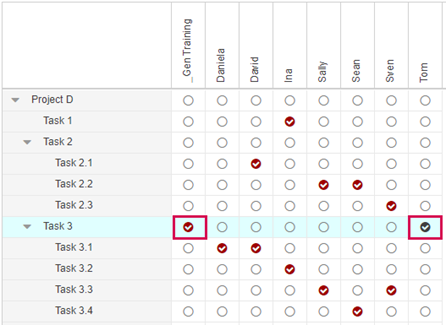
▪In the column of the new resource, activate the checkbox(es) of the task(s) where the original (generic) resource will be replaced.
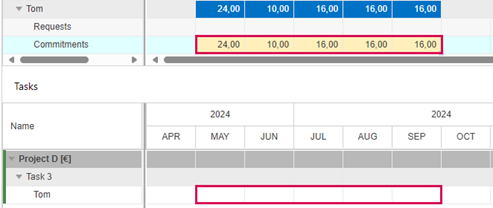
▪Switch to the Commitments view and click an entry of the new resource to show them in the Tasks table.
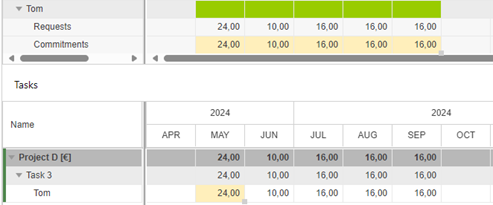
▪Copy the values in the Commitments row of the new resource and paste them to the resource row in the Tasks table.

▪Switch to the Matrix view.
The background of the checkmark(s) in the column of the new resource has turned red.
▪In the column of the original (generic) resource, deactivate the checkbox(es) of the task(s) where the resource has been replaced.