Plan
Plan is the main view for the detailed planning and maintenance of the data. There is one plan per team. When a team is opened (see Checking in and out), the plan opens by default.
In this view, all resources and their capacity, absences, line operations and project commitments are displayed and maintained in one table. Work hours, absences etc. are assigned to the resources in the right part, under the timeline. When a team plan is opened in TPG TeamManager for the first time, the left part of the table will show only the Name column. Further columns can be selected to display additional information (see Column filters and rearrangement).
The table comprises three levels: the team level, the project level and the individual resource level.
The project level is visible only after the projects have been imported (see Importing projects).
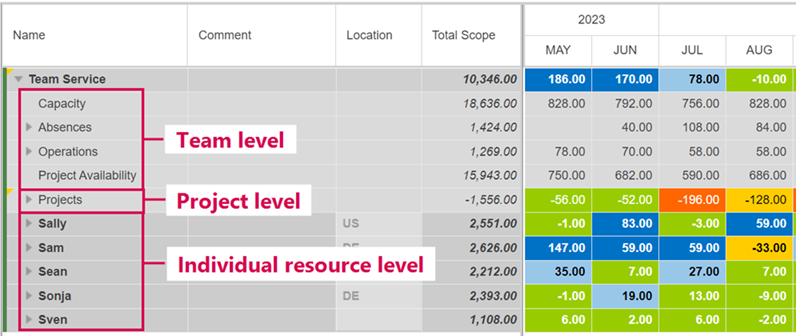
➤ If the team is a parent team whose sub-teams are displayed, the sub-teams are listed below the individual resources (see Opening a parent team with sub-teams).
The details table mentioned below is visible when an item is selected and the Details checkbox on the menu bar is selected.
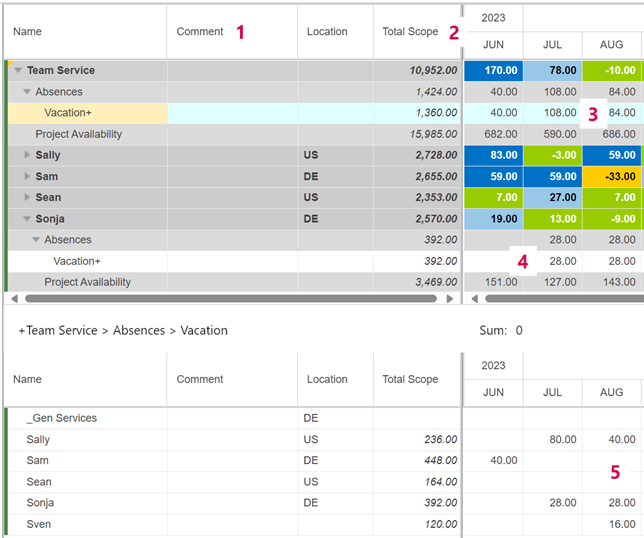
All time-phased data are entered in the white rows on the individual resource level (see figure below, 4) or in the details table (5). Selected cells can be copied and pasted from or to Excel.
The numbers in the gray rows under the timeline are calculated values from the cells below (3).
In the left part of the table, the Total Scope column (2) summarizes the values of each row for the visible range under the timeline (see Timeline range).
In the Comment column (1), you can enter comments in the row with the name of the team, an absence, an operation, a project or resource.
Except for the Auto column, the other columns are read-only. They display information stored in CoReAdmin or the project planning tool.