Replacing generic resources
|
Planning Procedure > Committing projects > Replacing generic resources |
For a rough planning, requests for generic resources can be approved in the Commitments row like requests for personal resources.
For a detailed planning, you will select a personal resource from your team who has sufficient availability and the skills required for the work assigned to the generic resource.
The personal resource can be a person already assigned to the project. Alternatively, you can assign another person to the project.
➤ You cannot replace a generic resource directly with a personal resource. Instead, you commit a personal resource for the work assigned to the generic resource. The replacement will be done by the project manager when synchronizing the project in their scheduling tool.
For example, in Project A, a generic resource is assigned to a task in June, July and August.
Sam, Sean and Sonja are members of the project team.
–In June, none of the project team members has enough availability to do the work of the generic resource (60h).
–In July, Sean is available for 139 hours and thus can do the work of the generic resource (90h).
–In August, Sam is available for 87 hours and thus can do the work of the generic resource (80h).
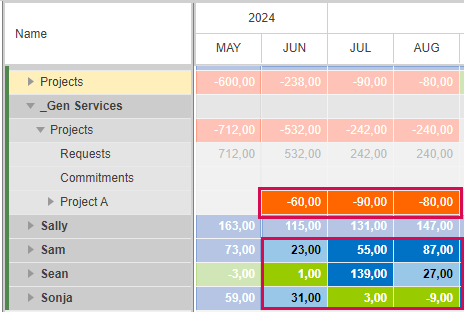
▪For July and August, enter the respective number of hours in the Commitments row of Sean and Sam (here: in the details table).
The fields in the name rows of Sean and Sam are blue because the commitment exceeds the request for these resources, in this case at 100%.
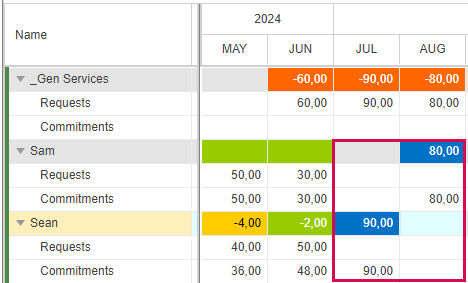
The red fields in July and August and the blue fields will turn green when:
▪The project manager has synchronized the data and replaced the generic resource with Sam and Sean
and
▪You then reimport the projects by clicking the Projects button in the Import group of the menu bar.
At the team level in the main table, July and August of Project A will turn green immediately because resources have been committed for all requested work.
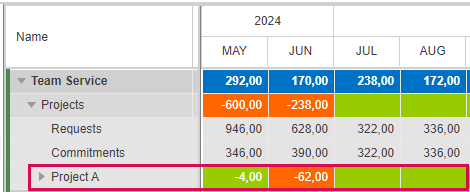
To fulfill the request for June, you can
▪divide the work of the generic resource between Sam and Sonja
or
▪add Sally to the project and commit her for the requested work
or
▪add Sally to the project and divide the requested work between Sally and Sam or Sonja.