Commitments
|
Work Interface and Views > Table views > Commitments |
Commitments is the view to get commitments or suggestions from the team managers and to adapt the project plan to resource availability.
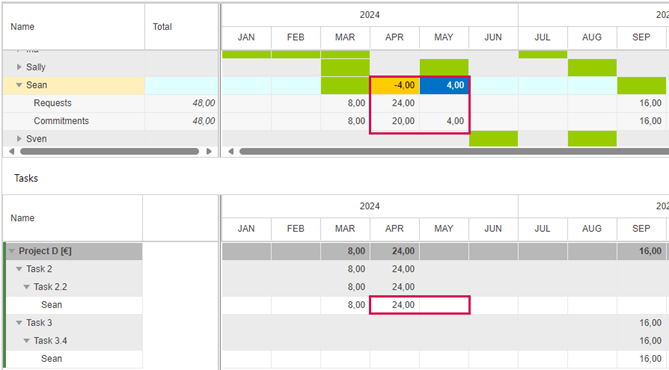
The view comprises two tables. The upper table shows the resources with their requested and committed project work.
The values in the colored cells show the individual commitment status of each resource, calculated by commitment minus request. Green cells without value indicate that the difference between request and commitment is zero.
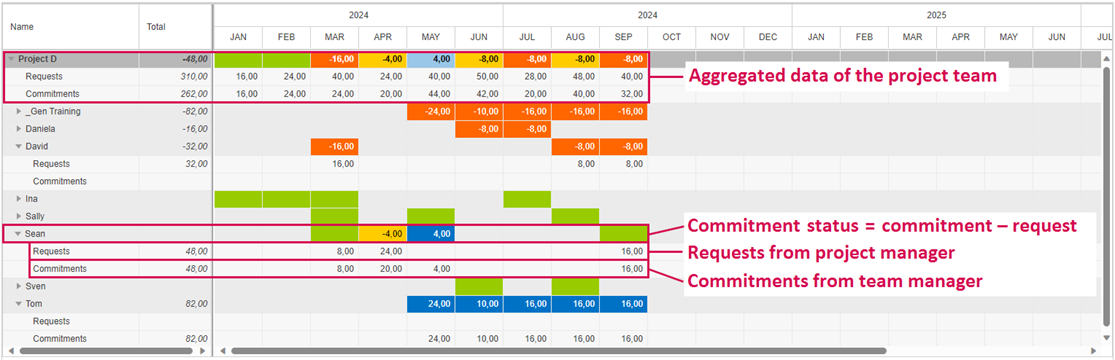
The commitment status is shown in heatmap colors according to preset thresholds.

The lower table (Tasks) shows part of the project plan depending on the cursor position in the upper table.
When a cell of the project summary task is clicked in the upper table, the lower table shows the entire project plan.
When any other cell is clicked in the upper table, the lower table shows the tasks and work data of the corresponding resource. Here, you adapt the project plan.
The example below shows the data of Sean. His work data for April and May need to be adapted in the Tasks table.