Showing committed work data
|
Planning Options > Editing assignments > Showing committed work data |
The work data shown in the scenario are requested data by default. If TPG TeamManager is used for resource commitments, committed work data can be shown for individual projects:
▪Go to the project table and double-click in the Committed cell of the project.
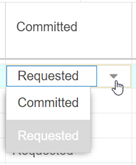
▪Open the drop-down menu and change the value from Requested to Committed.
The value will be saved and applied for all users of the scenario. It can be changed at any time.
▪Update the project.
The work hours will be updated from the Commitments rows in TPG TeamManager.