Editing work data
|
Planning Options > Editing assignments > Editing work data |
➤ You can enter time-phased data after a single or double click in a cell. Values can also be entered with copy and paste from the clipboard or by drag and drop.
If you enter assignment data in a time phase outside the planned time frame of the project, the project duration will be extended.
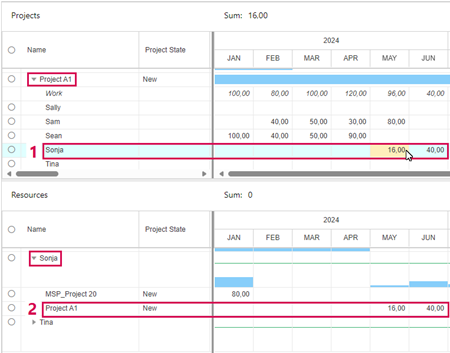
Assignment data can be edited in the project table or the resource table.
▪In the project table, expand the project and go to the row of the desired resource (1).
Or
▪In the resource table, expand the resource and go to the row of the desired project (2).
▪Enter the number of work hours you want to assign in a specific time phase or delete the value.
Data edited in the project table will automatically be transferred to the resource table and vice versa.
Copying a value to the neighbouring cells by drag and drop works both horizontally and vertically.
▪Enter the value in the first cell.
▪Drag the bottom right corner of the cell vertically or horizontally to copy the value.


