Deleting projects
|
Planning Procedure > Projects > Deleting projects |
⚠ There is no archiving or backup functionality in TPG CoRePlanner. Once deleted, projects cannot be restored.
Projects can only be deleted when they are in read mode. In the project list, these projects are marked with a light green line before the name.
▪ Click Open to show the project list.
▪Select the project you want to delete and click Delete at the bottom left.
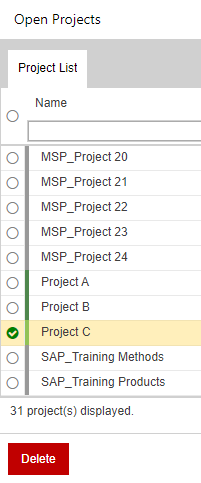
When projects marked in dark green or gray are selected, the Delete button is disabled.
Projects marked in dark green can be opened, set to read mode, closed and then deleted.
Projects marked in gray cannot be deleted.