Avoiding resource conflicts
|
Planning Procedure > Committing projects > Avoiding resource conflicts |
You will encounter the situation that a resource will be overloaded if you commit them to a project as requested. Depending on the skills and the availability of the individual resources, you can use one or a combination of the following options:
▪Commit another resource of the project team to the task
▪Assign another resource to the project and commit them to the task
▪Divide work between resources
▪Discuss with the project manager if a task can be shifted to another time phase
For example, in Project A, a generic resource is assigned to 60 hours work in June.
The remaining availability of the personal resources is as in the figure below. Sam, Sean and Sonja are members of the project team while Sally is not assigned to this project.
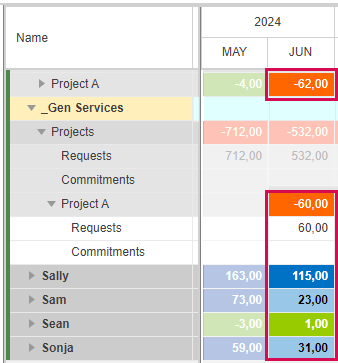
None of the members of the project team is available for 60 hours. If tasks cannot be shifted to another time phase, you have the following options:
Option 1: Divide work among the actual members of the project team
In the example above, Sean has only 1 hour availability left. Therefore, it does not make sense to assign him to part of the task.
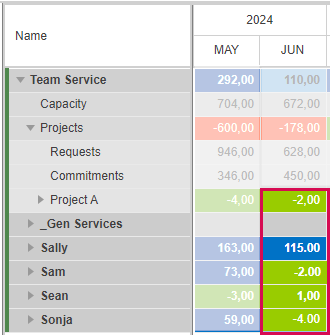
Sam is available for 23 hours and Sonja for 31 hours. The sum of 54 hours is less than requested, but as an overload within the threshold is regarded acceptable, you can commit Sam for 25 hours and Sonja for 35 hours.
After the commitment, the resource utilization cells of Sam and Sonja and the project cell at team level are green:
Option 2: Enlarge the project team
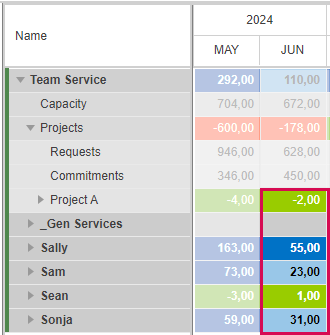
Alternatively, you can add Sally to the project. She has sufficient availability to work on the task for the requested 60 hours.
After committing Sally for 60 hours, none of the resources has an overload and the project cell at team level is green.
Depending on the task, you can also divide the work between Sally and Sam or Sonja.