Getting resource commitments
|
Planning Procedure > Commitments and Updates > Getting resource commitments |
In the Commitments view, the upper table shows the work data of your project in the Requests rows. The team managers get these requests when they import project data into TPG TeamManager. Depending on resource availability, the team managers will commit the requested resources or commit a personal resource for project work that was planned with a generic resource. If a requested resource is not available, the team manager can commit some other resource or make a suggestion, e.g., postponing the task or splitting it between two resources.
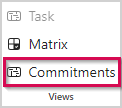
▪To switch to the Commitments view, select the project summary task and click Commitments in the Views group of the menu bar.
In the beginning, all commitment status cells are read because no commitments have been made yet.
▪Click Sync in the Project group of the menu bar.
This will synchronize the commitments made by the team managers into the upper table of the Commitments view.
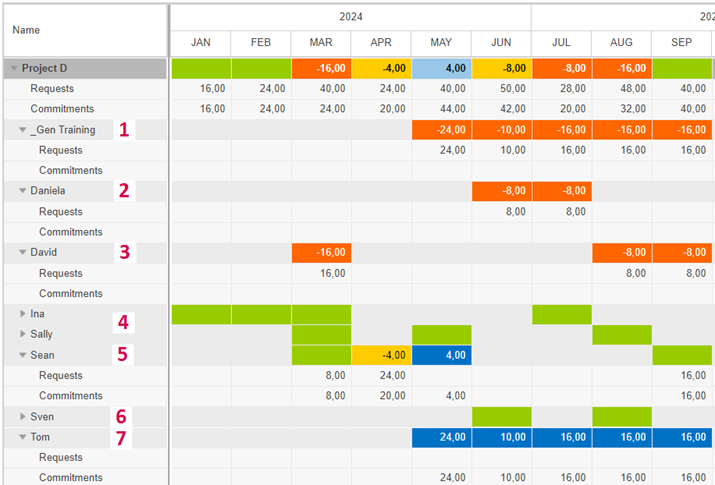
The example below shows the commitments made for Project D:
– The team manager of Daniela and David (2, 3) has not yet made any commitments.
– The project work for Ina, Sally and Sven (4, 6) has been committed as requested.
– The project work for Sean (5) has been committed, but 4 hours need to be moved from April to May.
April is yellow because the commitment is 4 hours (> 10%) less than requested for this month.
May is dark blue because the commitment is 4 hours (> 20%) more than requested for this month.
– Tom (7) is new in the project. He has no request values, but the committed hours are equal to the values requested for the generic _Gen Training (1). The team manager of team Training has assigned Tom to the project to replace the generic resource.
The next step is to adapt the project plan by shifting work and replacing the generic resource.