Currencies

The standard currencies of the CoReSuite are CHF, EUR, GBP and USD. Standard currencies cannot be deleted.
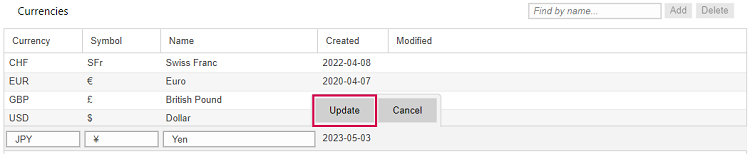
You can add custom currencies:
▪Click Add on the right above the table.

▪Fill out the fields.
The Name field is required.
▪Click Update.
▪To define an exchange rate, select the base currency in the Currencies table.
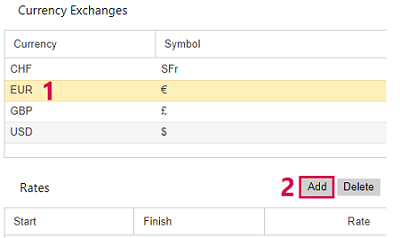
▪Select the counter currency in the Currency Exchanges table (1).
▪Click Add on the right above the Rates table (2).
▪Fill out the fields.
To enter the start and finish date, click the respective calendar icon and select a date.
▪Click Update.
▪Click Save at the bottom left.
▪If you want to delete a non-standard currency, select it and click Delete above the table.