New Function: Difference Aggregation at Group Level
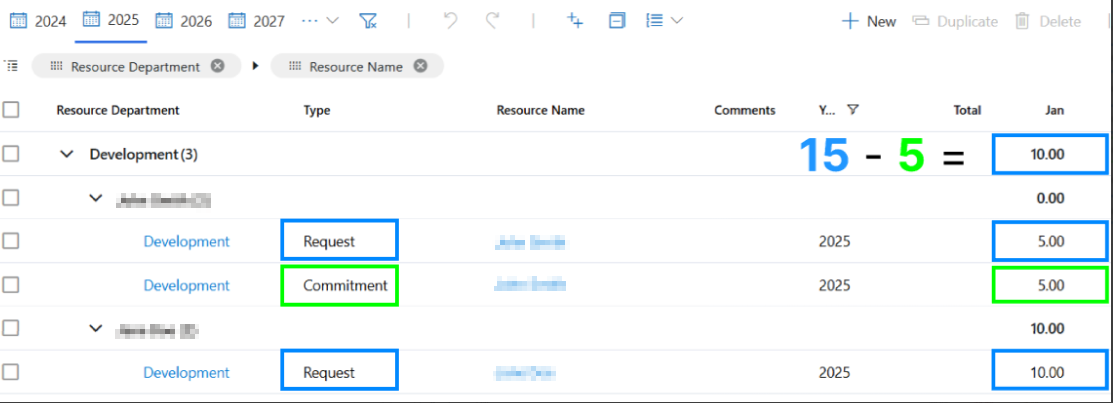
Admins can now configure a difference function for the aggregation of data at the group level. This function makes it possible to override the default sum aggregation and calculate differences between two categories of values instead.
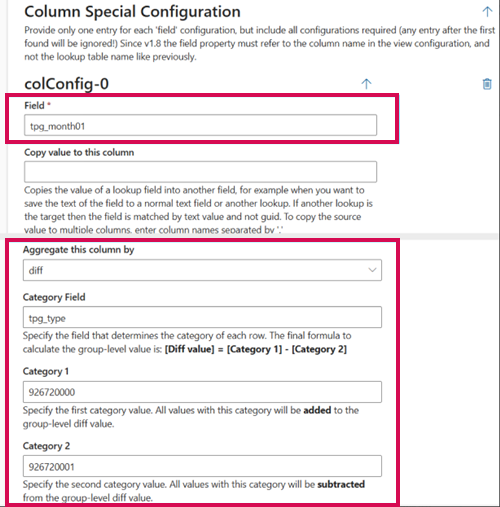
A new aggregate type option called "diff" has been added to the Column Special Configuration. When this option is selected, three additional fields are displayed:
▪Category Field: Defines the category to which each row belongs.
▪Category 1: Value used to determine the first category of values.
▪Category 2: Value used to determine the second category of values.
The user can input either string or integer values in the Category 1 and Category 2 fields. These are then compared against the values in the Category Field to determine which rows belong to which category.
The group-level Diff value is calculated using the formula: [Diff value] = SUM([Category 1]) - SUM([Category 2])
All row values categorized as Category 1 are summed and added to the group total, while values categorized as Category 2 are subtracted.
Configuration example:
In the example below, rows in blue represent Category 1 and rows in green represent Category 2. The resulting group-level Diff value demonstrates the subtraction logic in action: