Timesheet Effort Fields added to Tasks
The optional timesheeting functionality is now installed by default with the Scheduler deployment. As part of this change, some preparatory modelling has been completed to support two future timesheet report layouts.
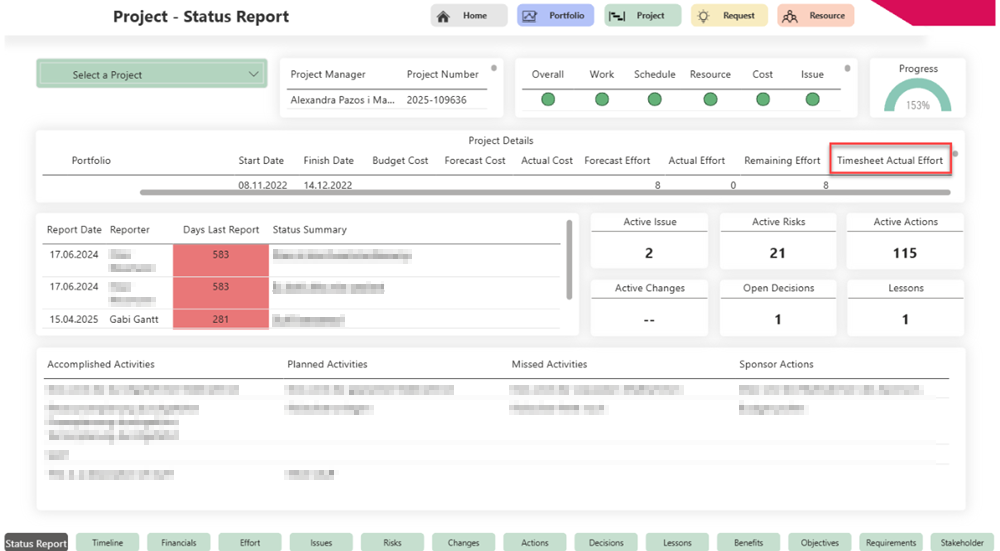
This includes a new Timesheet table with relevant measures, as well as a new field “Timesheet Actual Effort” (tpg_actualhrs) in the Tasks table. This field is only populated if a customer chooses to use the timesheeting functionality.
In addition, several new measures have been added to the Tasks table, including:
▪[_Timesheet Actual Effort]
▪[_Timesheet Remaining Effort]
▪[_Task Forecast Effort]
▪[Task Actual Effort]
▪[_Display CF TimesheetActualEffort > TaskForecastActual]
These measures are used in updated report layouts.
Project - Status Report:
Project - Effort:
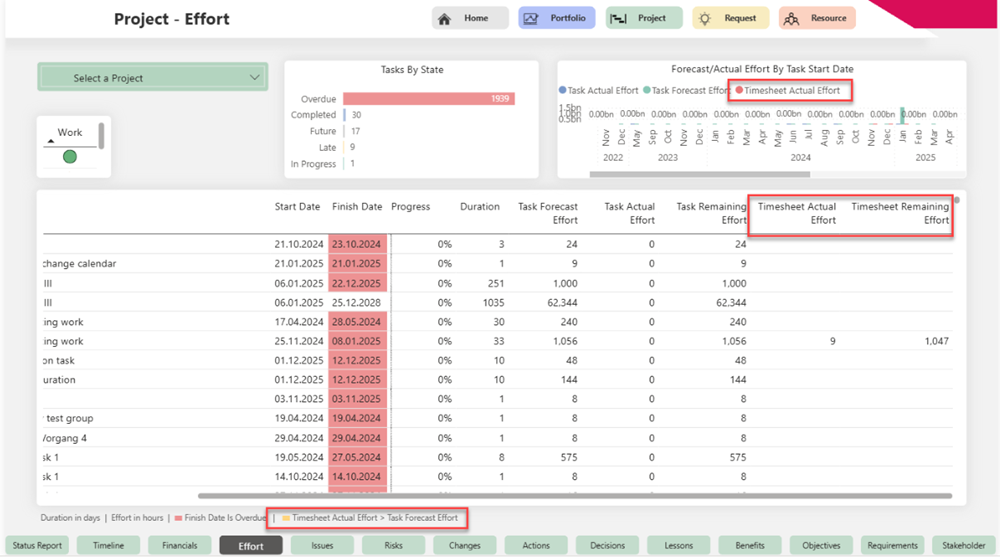
▶ In the Project Effort report, the background of the “Timesheet Actual Effort” column is conditionally highlighted (in amber) when the recorded timesheet effort exceeds the planned task effort (Task Forecast Effort).
This visual indicator draws the Project Manager’s attention to a potential overrun that should be considered in the project schedule. As timesheet entries may currently exceed planned values, this condition is highlighted intentionally. The handling of this scenario may change in future releases.