Column drag and drop for Kanban
|
Kanban > Column drag and drop for Kanban |
The Bucket columns on the Taskboard can be moved. There are two options:
1.Moving Buckets with drag & drop.
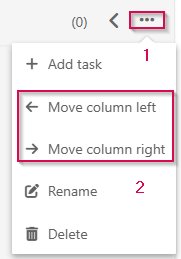
2.Using the dropdown menu on the Bucket:
▪Click the 3 dots in the top right-hand corner of the Bucket. (1)
▪Click Move column left or Move column right. (2)