Command Bar
The Command Bar is located above the Content Area.
The Command Bar contains buttons that provide you with various functions depending on the Content Area (e.g., Enterprise, Settings, Teams, Project Types). Some of these buttons are standardized and the same in every view, while others are displayed additionally depending on the Content Area.
Projects Content Area view
The following section explains the buttons using the Settings Content Area as an example:
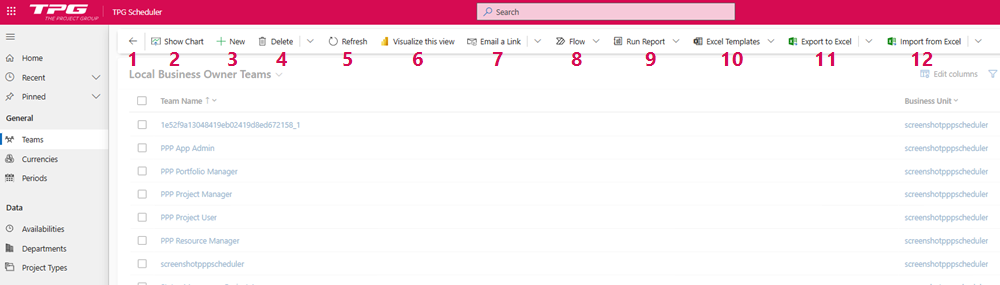
▪Go Back: Navigates to the previously opened page. (1)
▪Show Chart: Displays charts for the data records in the table in the Content Area. (2)
➢Click on Show Chart to display the chart.
➢Click on Hide Chart to hide the chart.
▪New: Create a new record. (3)
▪Delete: Deletes the selected record. (4)
⚠ This action cannot be undone.
▪Refresh: Page is being updated. (5)
▪Visualize this view: Creation of a visual report in Power BI about the current view. (6)
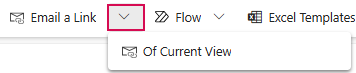
▪Email a Link: Sends a link to selected data records by email. (7)
➢Click the down arrow to send a link to the current view.
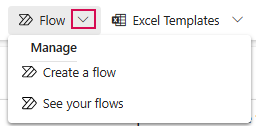
▪Flow: Runs a Flow for the selected project. (8)
➢Click the down arrow to manage Flows.
▪Run Report: Runs a report for the selected record. (9)
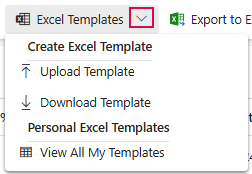
▪Excel Templates: Creation of Excel documents or templates. (10)
➢Click the down arrow to create Excel templates.
▪Export to Excel: Exports the data to a static or dynamic Excel worksheet or to an Excel pivot table. (11)
▪Import from Excel: Import data from Excel spreadsheet. (12)
▶ Standard chart views are displayed automatically when enabled. Most tables already contain basic charts, and additional charts can be added individually.
View with selected records
Once one or more records (e.g., PPP Project Manager) have been selected or marked, additional commands appear in the Command Bar:
▪Record set navigator (1)
▪Open in new window (2)
▪Smart paste: Analyzes the clipboard for form suggestions (3)
▪Save: Save the record.
▪Save & Close: The dataset is closed after saving.
▪Connect: Select connection roles to specify the records relationship structures
▪Check Access
▪Reassign Records
▪Process: Switch process
