Language Settings
The TPG PPP is available in the following languages: German, English, French, Arabic, Portuguese, Italian.
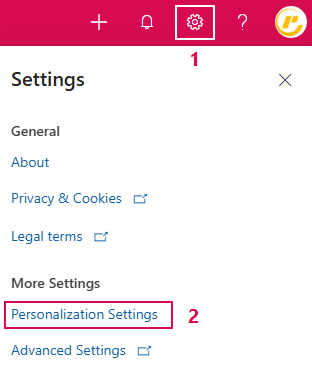
You can specify the language under Personalization Settings:
➢Click on the settings icon in the header bar (1)
➢Click on Personalization Settings (2)
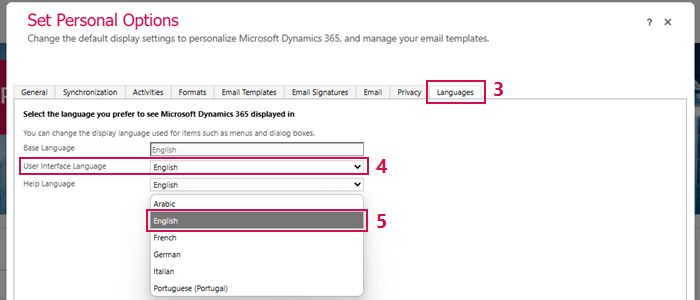
➢Click on the Languages tab (3)
➢Click on the User Interface Language field (4). ▶ A drop-down menu opens.
➢Select the desired language (e.g. English) (5).
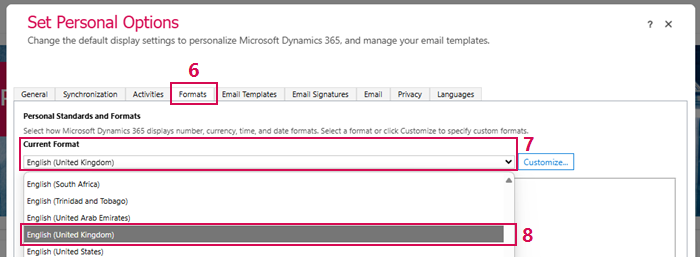
Customize formats of number, currency, time and date information:
➢Click on the Formats tab (6).
➢Click on the Current Format field (7). ▶ A drop-down menu opens.
➢Select the desired language (e.g. English (United Kingdom)) (8).
➢Click on OK (9)
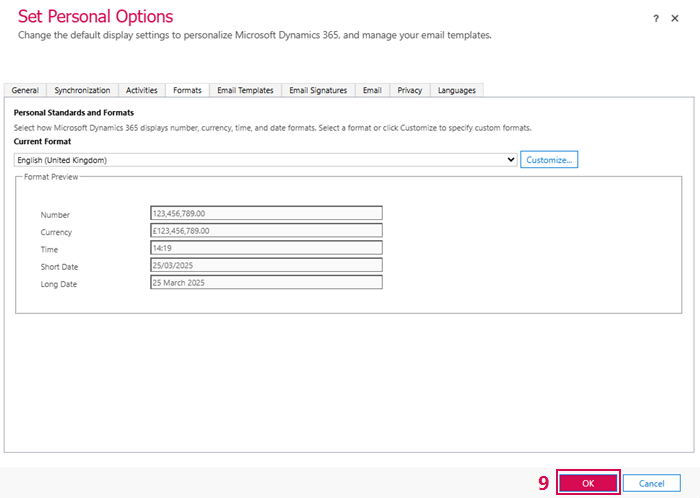
▶ The language, with the character formats, is set.