Resource Plans Overview
The Resource Plans overview provides a comprehensive view of all available resources in a tabular format.
To access the Resource Plans overview, follow these steps:
➢Click on Resource Plans in the navigation bar.
▶ The Resource Plans overview opens.
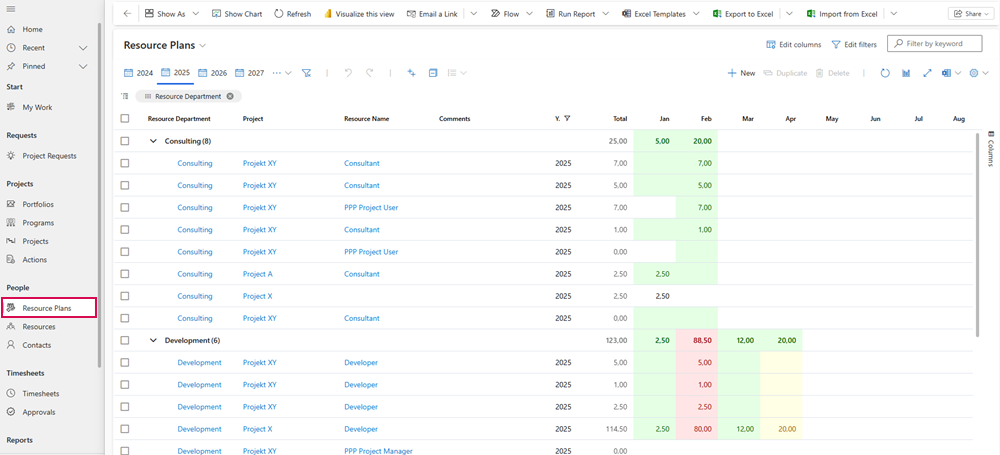
This view allows you to capture important information at a glance:
▪Resource Overview: All resources are listed in a table.
▪Department Assignment: Each resource is assigned to the corresponding department.
▪Project Assignment: The table shows the projects on which the resources are currently working.
▪Resource Name: The name of each resource is displayed.
▪Planned Working Time: The planned working time of each resource is broken down by month.
Color Scheme of Resource Availability:
The Resource Plans overview displays a heatmap that shows the availability of resources in percentage terms. This display is based on the totality of all resources in a department.
The following color scheme applies:
▪White: Indicates that the resources are 100% available.
▪Green: Indicates that more than 10% of the resources are available.
▪Yellow: Indicates that the availability of resources is between -10% and +10%.
▪Red: Indicates that less than -10% of the resources are available.
The Mouseover shows the availability as a percentage: