Project KPIs
This section groups the key performance indicators (KPIs) of your project into various categories. These categories help you to quickly understand the progress and performance of your project at a glance.:
The KPIs are divided into the following main categories:
▪Overall KPI: This KPI provides an overview of the overall progress and status of the project.
▪Cost KPI: This KPI monitors the actual costs compared to the planned budget.
▪Issue KPI: This KPI shows problems and risks in the project.
▪Resource KPI: This KPI shows the utilization and availability of project resources, such as personnel, materials and equipment.
▪Schedule KPI: This KPI monitors progress against the schedule.
▪Work KPI: This KPI shows the productivity and efficiency of the project work (does work performance meet expectations).
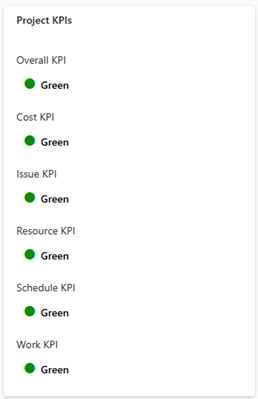
The status of each KPI is visualized by a traffic light indicator:
▪Green: There are no problems.
▪Yellow: There are minor deviations or risks that should be monitored.
▪Red: There are significant problems or delays that require immediate attention.
▶ This traffic light indicator enables you to quickly recognize the current status of the project and take action if necessary.
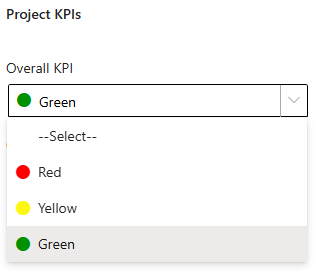
You can change the status of the KPIs in this area:
➢Select the KPI whose status you want to change.
➢Click on the KPI. ▶ A drop-down menu opens.
➢Click on the color that visualizes the desired status.
▶ The status of the KPI is changed.