Register an Azure Tenant
Prerequisites:
Information from the Azure platform is required to set up the Azure tenant.
➢Follow these links to obtain the information:
▪Azure Tenant ID: https://learn.microsoft.com/en-us/entra/fundamentals/how-to-find-tenant
▪Object ID of the user or application to be managed in PSLink: https://learn.microsoft.com/en-us/partner-center/account-settings/find-ids-and-domain-names
The subsequent management of users and roles requires the appropriate administrator permissions: Tenant Administrator or Site Administrator for the respective site.
Register an Azure tenant:
After the PSLink tenant has been provisioned, the future tenant administrator will receive a personalized access link to their tenant on the PSLink Cloud Platform. To register for the first time, follow these steps:
➢Open the PSLink link provided by TPG.
➢You will be redirected to the Microsoft sign-in page.
➢Sign in with the user account designated as the tenant administrator.
➢Click Accept to confirm the permissions displayed.
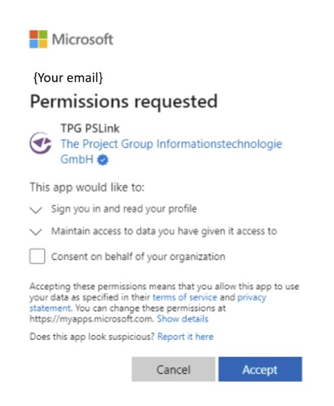
PSLink requires access to basic user information, such as:
▪Display name,
▪Email address,
▪Profile picture.
▶ This information is used, for example, for user displays and the job history.
After you successfully sign in, the application is registered in the tenant, and you are taken to the PSLink home page.
At the same time, the application will appear in the Enterprise Applications section of your Azure tenant.
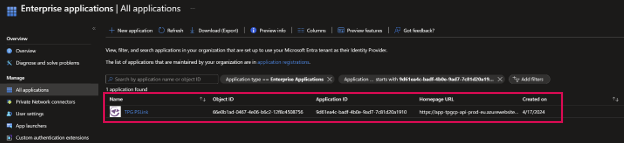
Grant administrative consent for the tenant:
To ensure that all users in the company can use PSLink, an Azure administrator should grant administrative consent (Admin Consent):
➢Open the Microsoft Entra Admin Center.
➢Navigate to Enterprise Applications.
➢Select the TPG PSLink application.
➢Open the Permissions section and grant administrative permission for your Azure tenant.
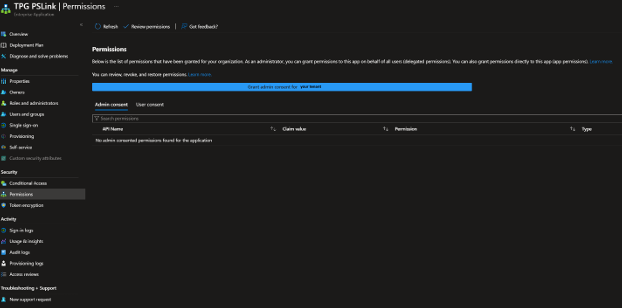
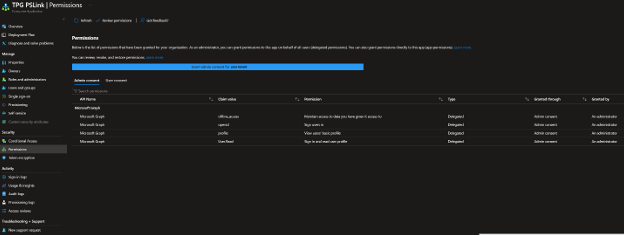
▶ Once approved, users will no longer need to confirm permissions themselves when they log in for the first time.