Project table
|
Work Interface and Views > Scenario > Project table |
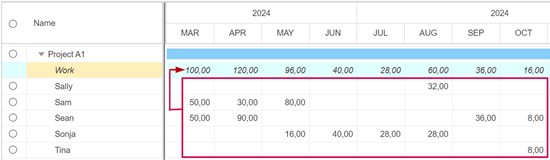
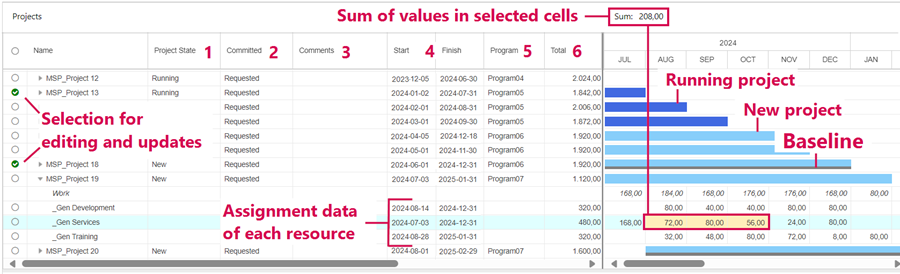
The project table lists all projects of the opened scenario. Assigned resources are shown as sub-items.
Entries above the first project show the aggregated data of the scenario projects.
As soon as the cursor is placed in the project table, the Projects tab is opened.
➤ The Work row mentioned below and the Gantt bars are shown by default. You can hide or unhide them by using the respective checkbox in the Show group of the Projects tab.
Columns:
1) |
Project State: The value is Running or New and is shown in the bar chart by color. The colors can be changed by the administrator. The project state can be changed manually by the user. |
2) |
Committed: The value is Requested or Committed and refers to the assigned work. By default, the table shows requested work hours. The value can be changed manually by the user but committed work hours will only be shown if TPG TeamManager is used for resource commitments. |
3) |
Comments: Comments can be entered in the rows of the project names. General scenario comments can be accessed via right-click in the scenario row > Display Comments. |
4) |
Start/Finish: Start and finish date of the project (project row) or the assigned work (resource row) |
5) |
Program: Custom field showing the program to which a project belongs |
6) |
Total: Total amount of work assigned to each project (project row) or resource (resource row) |
The Work row is read-only. It shows the sum of project work of the assigned resources per time phase.