Opening a parent team with sub-teams
Teams can be ordered in a hierarchical structure:
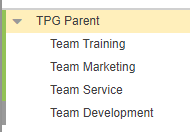
You can open the plan of the parent and each of the sub-teams like single teams. The plan will contain only the data and resources of the selected team.
If you want to display the sub-teams together with the parent team:
▪Select the parent team.
▪Select Include Sub-Teams and click Open.

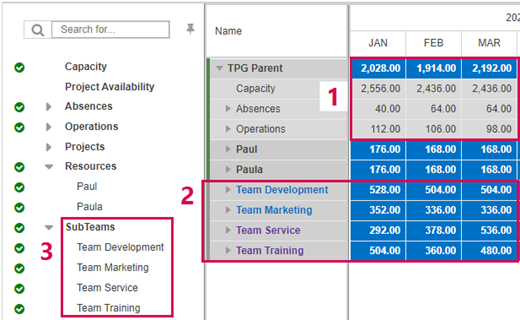
The plan will show the data of the sub-teams below the resources of the parent team. The data at team level (1) are the aggregated values of the parent and the sub-teams.
The sub-teams are read-only because data can only be edited in the plan of the respective team. Therefore, the sub-teams are marked with a gray line (2). You can open the plan of a sub-team in a new browser tab by clicking the team name.
If projects have already been imported (see Importing projects), the projects that have assignment requests for only the sub-teams will also be read-only.
In the filter pane, the sub-teams are the lowest level (3) but in the main table, you can expand them to see all data.