Changing the project state or general project data
|
Planning Options > Editing projects > Changing the project state or general project data |
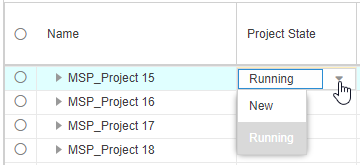
The project state and other project properties can be edited. When projects from TPG CoRePlanner are loaded into the scenario, the project state is the value specified in TPG CoRePlanner. For projects planned in some other tool, the default project state is Running. The project bar of running projects is dark blue.
You can change the project state according to the start date or use the function for some other differentiation.
Other information about a project, e.g. priority or KPIs, is shown in custom fields depending on the settings of your organization.
➤ Project properties can be changed only in the project table. In the resource table, the Project State column will show the values but the cells are read-only.
When you update the project, the changes you made in custom fields will be overwritten by the source data. The project state will be overwritten only for projects planned in TPG CoRePlanner.
▪To edit the project state or some other project property, double-click in the respective cell.
▪Enter or select the desired value.
When the Project State value is set to New, the project bar will turn light blue.