Matrix
The Matrix view shows the assignment of the resources to the project tasks. Here, you can assign resources to individual tasks before entering the effort values in the Task view.
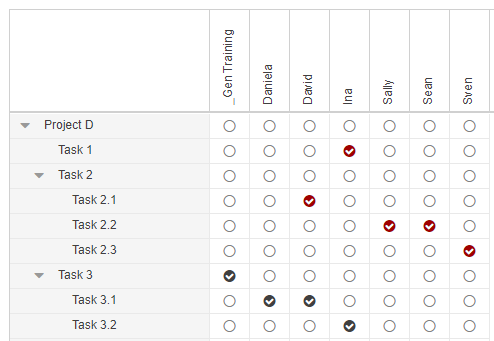
 Red background: assignment with time-phased data in the project plan
 Black background: assignment without time-phased data in the project plan
Assignments can be established by selecting the appropriate checkbox(es). Removing the checkmarks deletes the assignments.
➤ When you delete an assignment marked in red, the time-phased values of the respective resource in the project plan will also be deleted. Therefore, a confirmation / warning prompt is displayed: You are removing an assignment with time-phased data or custom field values! Would you like to continue?
When you delete an assignment marked in black, there is no confirmation / warning prompt.
Commitment values saved in TPG TeamManager will be reloaded when you click the Sync button in the Projects group of the menu bar.