Work Interface and Views
When you open TPG CoRePlanner, all functions of TPG CoRePlanner are on the Ribbon.

There are three views for planning which can be accessed via the buttons in the Views group of the General tab:
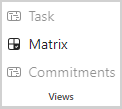
Task: Main view for task planning. Shows the project tasks with assigned resources as sub-items
Matrix: Assignment of resources to tasks in a matrix view
Commitments: Shows the resource commitments made by the team managers.
➤ To switch from the Task view to another view, the project summary task must be selected.