Configure Validation Rules for Timesheet Entries
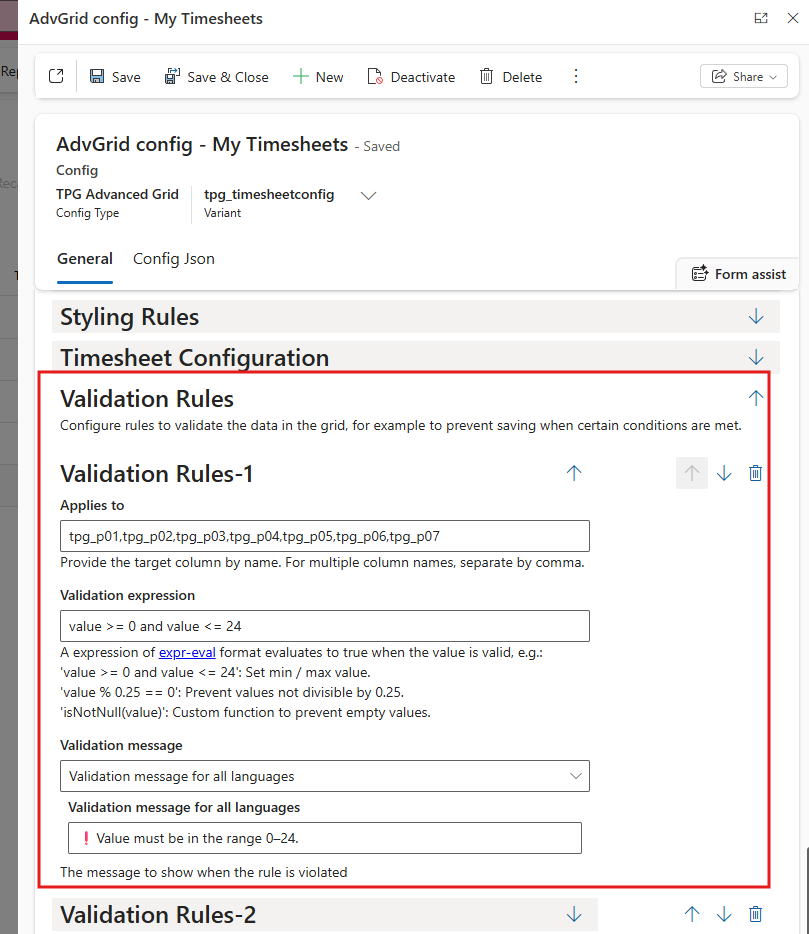
Administrators can now define custom validation rules for Timesheet period columns through the add-on configuration. Rules are configured per column and consist of a validation expression and a corresponding warning message.
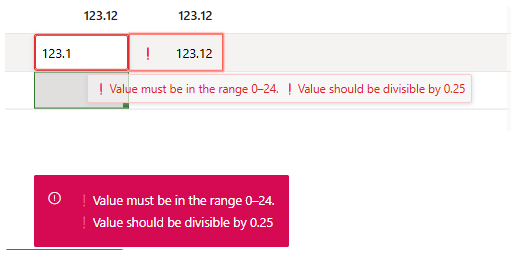
Values that do not meet the configured validation criteria cannot be saved, whether entered manually, copied and pasted, or filled using drag-fill. Cells with validation errors are highlighted with a red border and a warning indicator. Hovering over the cell displays the validation message in a tooltip. When invalid values are pasted, validation warnings are also shown in a toast notification.
As part of this enhancement, the following components have been upgraded to the latest versions:
▪AG Grid: 30.2 → 35.3.1
▪AG Charts: 7.3 → 13.3.1