Submit Timesheets on behalf of other Users
Added configuration: Timesheet Configuration – Enable Delegation
When Enable Delegation is enabled, users can submit and manage timesheets on behalf of other users they have been delegated to represent.
User view
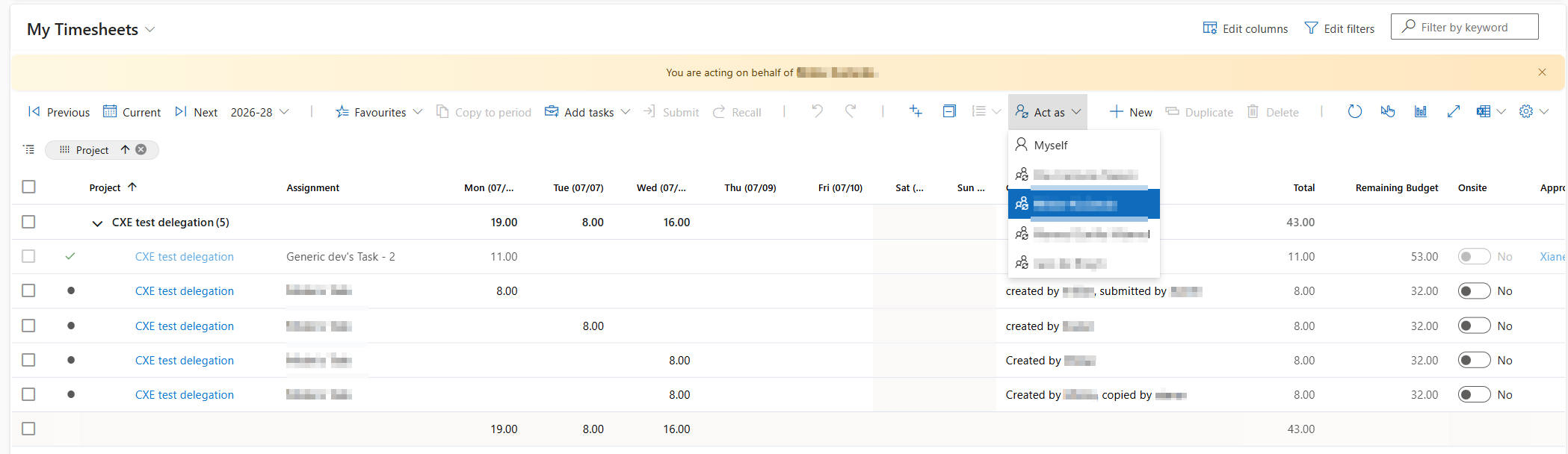
▪Adds an Act as button to the timesheet when the current user is a delegate for one or more users.
▪After selecting an Act as user, the timesheet refreshes to display that user's records.
▪The grid includes all timesheet records booked for the selected user, regardless of whether they were created by the user or one of their delegates.
▪A banner indicates that the user is currently acting on behalf of the selected user.
Approver view
▪Adds a Submitted for column to the timesheet grid.
▪The column uses a fallback value to ensure it is always populated with the booked-for user, making it suitable for Group by operations.
▪When Enable Delegation is disabled, the Submitted for column is hidden by default.