Highlight Delayed Tasks in Scheduler
|
PPP Scheduler Changes > Scheduler App > Highlight Delayed Tasks in Scheduler |
A new highlighting option makes it easier to identify delayed tasks in the Scheduler.
A task is considered delayed when:
▪its scheduled finish date is in the past,
▪it is not yet 100% complete, and
▪it is still active (not marked as inactive).
When enabled, delayed tasks are highlighted in both the grid and the Gantt chart. Delayed milestones are highlighted as well.

The feature can be enabled or disabled in the Scheduler settings. A default highlight color is provided, and users can optionally define a custom color.
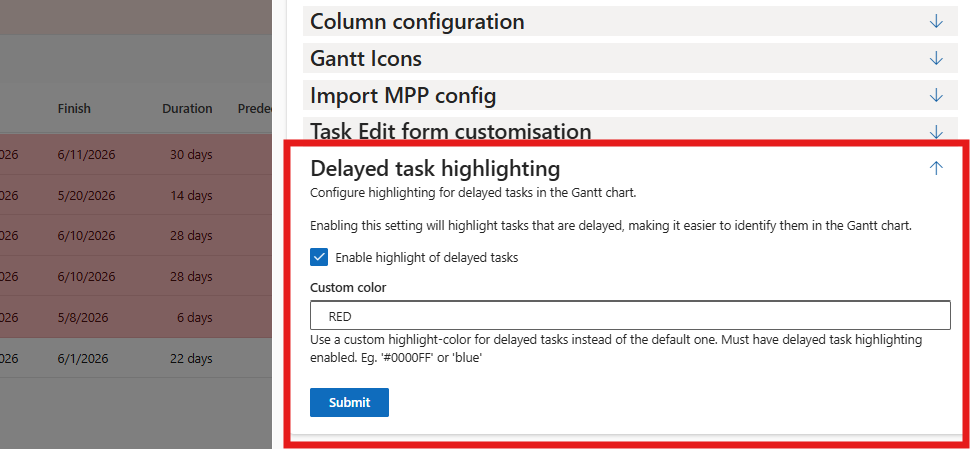
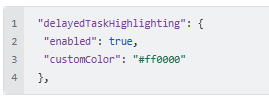
The highlight color can also be configured directly in the Scheduler JSON settings, for example:
When Show Critical Path is enabled, the critical path highlighting takes precedence in the Gantt chart. Tasks on the critical path will therefore use the critical path color instead of the delayed task highlight color.
This is a visual-only feature and does not modify any project or task data.
Custom Color Nomenclature:
Format |
Example |
Notes |
|---|---|---|
Named |
red |
148 keywords - limited palette |
Hex |
#ff6600 / #f60 |
6- or 3-digit; add 88 for 50% alpha (#f608) |
Hex RGBA |
#ff660080 |
8-digit — not supported in older browsers (IE11, Safari <10) |
rgb/rgba |
rgb(255 102 0) / rgba(255 102 0 / .5) |
Commaless modern syntax. / separates alpha. Preferred for readability |