MS Project Projektplan zu PPP synchronisieren
|
Konfiguration > TPG PSLink > Pre-defined Jobs > MS Project Projektplan zu PPP synchronisieren |
Mit diesem Job veröffentlichen Sie den Zeitplan aus MS Project Desktop im zugeordneten TPG ProjectPowerPack-Projekt. Dabei werden Vorgänge, Vorgangsverknüpfungen und die entsprechend gemappten Planungsinformationen nach PPP übertragen.
TPG PSLink verwendet die in den Projektinformationen hinterlegte PPP_ID, um das passende TPG ProjectPowerPack-Projekt eindeutig zu identifizieren und die Daten dorthin zu übertragen.
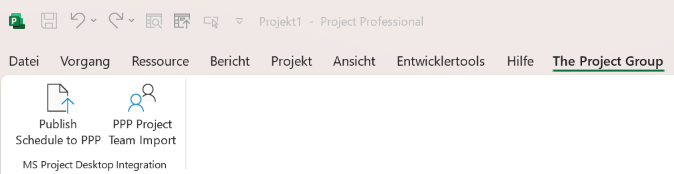
Der Job wird üblicherweise über die entsprechende Menü-Schaltfläche gestartet, zum Beispiel Publish Schedule to PPP (s. Integrations-Jobs über Add-In ausführen)
Task Field Mapping
Das Task Field Mapping legt fest, welche Vorgangsfelder aus MS Project Desktop in welche Zielfelder in PPP übertragen werden. Dadurch verwenden beide Systeme dieselben Planungsinformationen.
MS Project |
PPP |
PPP interner Spalten-Name |
PPP interner Tabellen-Name |
|---|---|---|---|
|
Actual Hours |
tpg_actualhrs |
tpg_projecttask |
BaselineFinish |
Baseline Finish |
tpg_baselinefinish |
tpg_projecttask |
BaselineStart |
Baseline Start |
tpg_baselinestart |
tpg_projecttask |
|
Bucket |
tpg_bucket |
tpg_projecttask |
|
Task Calendar |
tpg_calendar |
tpg_projecttask |
|
Color |
tpg_color |
tpg_projecttask |
ConstraintDate |
Constraint Date |
tpg_constraintdate |
tpg_projecttask |
ConstraintType |
Constraint Type |
tpg_constrainttype |
tpg_projecttask |
Deadline |
Deadline |
tpg_deadline |
tpg_projecttask |
Notes |
Notes |
tpg_description |
tpg_projecttask |
Duration |
Duration |
tpg_duration |
tpg_projecttask |
'days' |
Duration Unit |
tpg_durationunit |
tpg_projecttask |
|
Effort (DEPRECATED) |
tpg_effort |
tpg_projecttask |
|
Expanded |
tpg_expanded |
tpg_projecttask |
GUID |
External UID |
tpg_external_uid |
tpg_projecttask |
Finish |
Finish |
tpg_Finish |
tpg_projecttask |
|
Indicators |
tpg_icon |
tpg_projecttask |
|
Ignore resource calendar |
tpg_ignorerescalendar |
tpg_projecttask |
Active |
Inactive |
tpg_inactive |
tpg_projecttask |
Critical |
Critical |
tpg_iscritical |
tpg_projecttask |
EffortDriven |
Effort Driven |
tpg_iseffortdriven |
tpg_projecttask |
Manual |
Manually Scheduled |
tpg_ismanual |
tpg_projecttask |
Milestone |
Is Milestone |
tpg_ismilestone |
tpg_projecttask |
Rollup |
Rollup |
tpg_isrollup |
tpg_projecttask |
Summary |
Summary Task |
tpg_issummary |
tpg_projecttask |
|
Is Variant |
tpg_isvariant |
tpg_projecttask |
|
Key Milestone |
tpg_keymilestone |
tpg_projecttask |
|
Link |
tpg_link |
tpg_projecttask |
|
Locked |
tpg_locked |
tpg_projecttask |
OutlineLevel |
Outline Level |
tpg_outlinelevel |
tpg_projecttask |
implizit durch die Eigenschaft „nav“ festgelegt |
Parent Index |
tpg_parentindex |
tpg_projecttask |
implizit durch die Eigenschaft „nav“ festgelegt |
Parent Task |
tpg_parenttask |
tpg_projecttask |
|
Predecessors placeholder |
tpg_predecessorsplaceholder |
tpg_projecttask |
Priority |
Priority |
tpg_priority |
tpg_projecttask |
PercentComplete |
% Complete |
tpg_progress |
tpg_projecttask |
implizit festgelegt |
Project |
tpg_project |
tpg_projecttask |
|
Resource Names |
tpg_resourcesplaceholder |
tpg_projecttask |
Type Always Set to 'Normal' |
Scheduling Mode |
tpg_schedulingmode |
tpg_projecttask |
|
Show in Timeline |
tpg_showintimeline |
tpg_projecttask |
|
Source Reference |
tpg_sourceref |
tpg_projecttask |
Start |
Start |
tpg_start |
tpg_projecttask |
Name |
Name |
tpg_subject |
tpg_projecttask |
|
Todos |
tpg_todos |
tpg_projecttask |
WBS |
WBS |
tpg_wbs |
tpg_projecttask |
|
Weight |
tpg_weight |
tpg_projecttask |
Work |
Effort |
tpg_work |
tpg_projecttask |
'hour' |
Effort Unit |
tpg_workunit |
tpg_projecttask |
Template für die Jobkonfiguration
Die Template Job Configuration definiert, wie der Schedule-Sync-Job ausgeführt wird. Sie enthält die technische Jobdefinition, die verwendeten Mappings und die Logik für die Übertragung der Vorgänge nach PPP.
▶ Ein Template für die Job-Konfiguration erhalten Sie von Ihrem TPG-Berater.