Read Tooltips in the Timephased Planning view
|
Resource Planning > Timephased Planning > Read Tooltips in the Timephased Planning view |
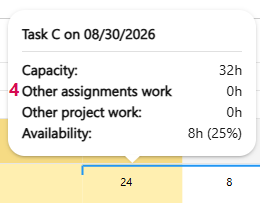
Expanded tooltips are available in the timephase cells. When you hover your mouse over a timephase cell, you’ll see information about availability, planned effort, and additional work for that same resource in other projects.
▪The tooltip displays the name of the task to which the resource is assigned. (1)
▪You’ll see the effort assigned to the task. (2)
▪You’ll see the resource’s capacity. (3)
▪Additional work from other projects is included so that potential resource conflicts can be identified early on. (4)
▶ The information is available both on individual allocation lines and on aggregated resource lines.
▪You can see the resource's availability. (5)

Tooltip disabled:
➢Click the Enable tooltip slider to turn the tooltip on or off.