Adding exceptions to calendar
Workday exceptions can be added to calendars per year. It is possible to add exceptions to more than one year at a time.
You can select individual exceptions or groups of exceptions to add to a calendar.
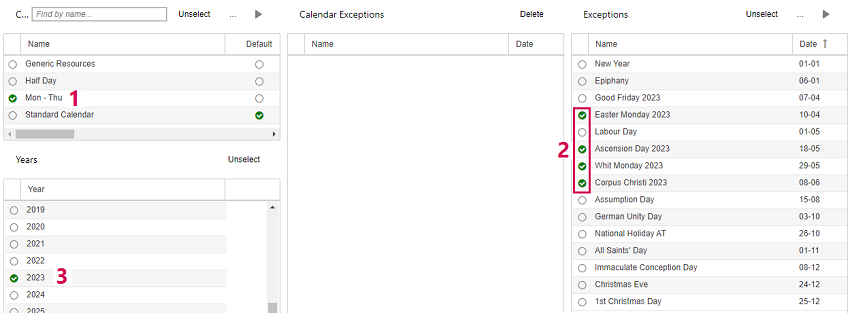
▪Select the calendar and the year(s) to which you want to add exceptions (1, 3).
▪To add individual exceptions, select the items you want to add in the Exceptions table (2).
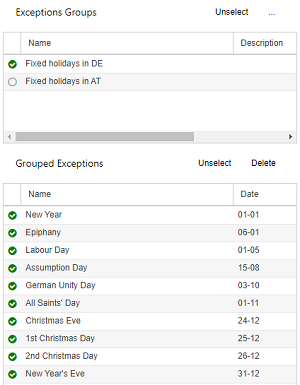
▪Alternatively, select one or more groups in the Exceptions Groups table.
▪If the group contains items you do not want to include, deselect them in the Grouped Exceptions table.
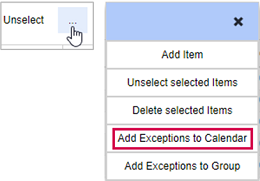
▪Click the three dots above the table from which you selected the items and select Add Exceptions to Calendar.
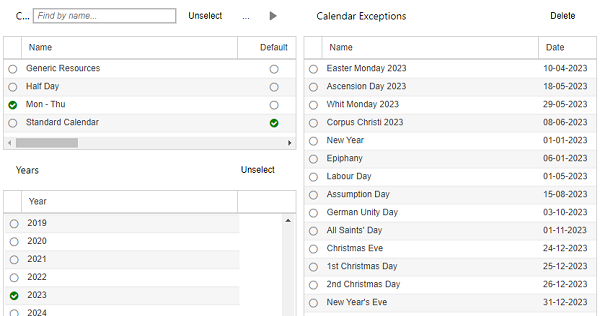
The exceptions will be shown in the Calendar Exceptions table.
In the example below, individual exceptions and the group were added subsequently. After refreshing the page, the exceptions will be sorted by date.

▪If you want to delete an exception from the calendar, select it in the Calendar Exceptions table and click Delete above the table.