Synchronize Resources
|
Configuration > TPG PSLink > Pre-defined Jobs > Synchronize Resources |
This job imports the project team from TPG ProjectPowerPack into MS Project Desktop. This ensures that project managers use the correct resources when planning.
▶ Before running the job, make sure your project is already linked to a TPG ProjectPowerPack project. To do this, enter the corresponding TPG PPP Project GUID in the project information (see Pre-defined Jobs).
When the job runs, TPG PSLink retrieves the following information from your TPG ProjectPowerPack project plan and assigns it to the resources in your MS Project desktop plan:
▪Project Team
▪Resource Type: Corporate Resource
▪Resource Type: Local Resource
▪For each corporate resource:
▪Availability
▪Non-working days
During the update, the system checks each entry against the defined matching criteria.
If the system cannot determine a unique assignment - either because no matching resource is available or because multiple possible matches are found - a dialog box appears.
In this dialog box, you can review the detected assignments, select the appropriate resource, or proceed to create a new resource.
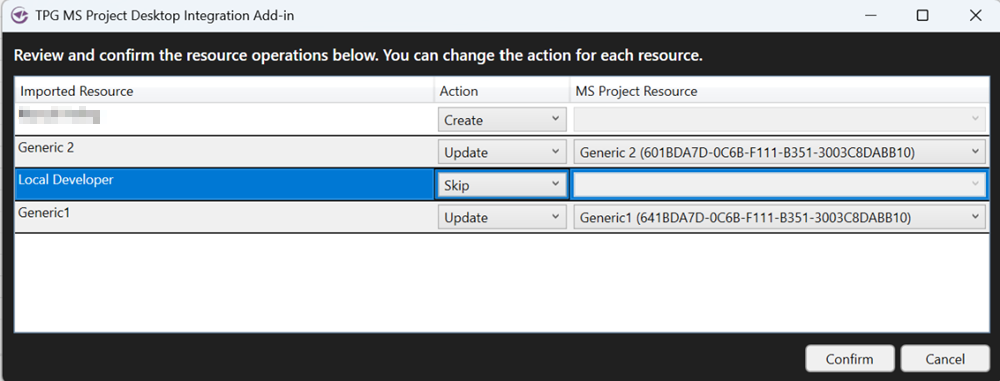
For each resource, you can select one of the following options:
➢Create as a new resource in the plan
➢Skip resource
➢Update existing resource
➢Select Confirm to update the resources in your MS Project Desktop plan.
➢Select Cancel if you want to exit the process without making any changes.
▶ The dialog box will reappear during subsequent updates as long as the data does not allow for a unique match. Prepare the data accordingly - for example, by removing duplicate resources or ensuring unique matches.
Resource Field Mapping
Resource Field Mapping determines how resource information from PPP is mapped to the resource fields in MS Project Desktop.
PPP |
PPP internal Column Name |
PPP internal Table Name |
MS Project Desktop |
|---|---|---|---|
Base Calender |
tpg_basecalender |
tpg_resourcepool |
'Default' from PPP also maps to 'Standard'
otherwise an exact name mapping is tried. For PPP local resources, the MS Project Standard calendar is used.
|
Contact |
tpg_contact |
tpg_resourcepool |
|
CoReSuite Id |
tpg_csuid |
tpg_resourcepool |
|
Created By |
createdby |
tpg_projectteam |
|
Created By (Delegate) |
createdonbehalfby |
tpg_projectteam |
|
Created On |
createdon |
tpg_projectteam |
|
Currency |
transactioncurrencyid |
tpg_projectteam |
|
Department |
tpg_dept |
tpg_projectteam |
Group |
Department Name (Internal) |
tpg_deptnameinternal |
tpg_resourcepool |
|
Earliest Availability |
tpg_earliestavailability |
tpg_resourcepool |
|
Exchange Rate |
exchangerate |
tpg_projectteam |
|
External Id |
tpg_extid |
tpg_resourcepool |
|
External UID |
tpg_external_uid |
tpg_resourcepool |
|
Image |
tpg_imageurl |
tpg_projectteam |
|
Import Sequence Number |
importsequencenumber |
tpg_projectteam |
|
Job Title |
tpg_jobtitle |
tpg_resourcepool |
|
Last CoReSuite Sync |
tpg_cslastsync |
tpg_resourcepool |
|
Latest Availability |
tpg_latestavailability |
tpg_resourcepool |
|
Location |
tpg_location |
tpg_resourcepool |
|
Max Units |
tpg_maxunits |
tpg_projectteam |
MaxUnits |
Modified By |
modifiedby |
tpg_projectteam |
|
Modified By (Delegate) |
modifiedonbehalfby |
tpg_projectteam |
|
Modified On |
modifiedon |
tpg_projectteam |
|
Name |
tpg_name |
tpg_projectteam |
Name |
Owner |
ownerid |
tpg_projectteam |
|
Owning Business Unit |
owningbusinessunit |
tpg_projectteam |
|
Owning Team |
owningteam |
tpg_projectteam |
|
Owning User |
owninguser |
tpg_projectteam |
|
Record Created On |
overriddencreatedon |
tpg_projectteam |
|
Resource |
tpg_resourcepoolid |
tpg_resourcepool |
Text30 |
Resource Type |
tpg_resourcetype |
tpg_projectteam |
Enterprise Generic |
Skills |
tpg_skills |
tpg_resourcepool |
|
Standard Rate |
tpg_standardrate |
tpg_projectteam |
StandardRate |
Standard Rate (Base) |
tpg_standardrate_base |
tpg_projectteam |
|
Status |
statecode |
tpg_projectteam |
|
Status Reason |
statuscode |
tpg_projectteam |
|
Team Member |
tpg_projectteamId |
tpg_projectteam |
Text29 |
Time Zone Rule Version Number |
timezoneruleversionnumber |
tpg_projectteam |
|
User |
tpg_user |
tpg_resourcepool |
|
User First Name |
tpg_userfirstname |
tpg_resourcepool |
|
User Full Name |
tpg_resourcename |
tpg_resourcepool |
|
User Image |
tpg_userimage |
tpg_resourcepool |
|
User Last Name |
tpg_userlastname |
tpg_resourcepool |
|
UTC Conversion Time Zone Code |
utcconversiontimezonecode |
tpg_projectteam |
|
Version Number |
versionnumber |
tpg_projectteam |
|
Availabilitys
The availabilitys of PPP enterprise resources are mapped to the resource availabilitys in MS Project Desktop. The corresponding maximum units are carried over.
If no availabilitys exist for a PPP enterprise resource, the corresponding availabilitys are also deleted from MS Project Desktop.
Non-Working Days
The non-working days for each PPP enterprise resource are imported into MS Project Desktop as exceptions in the resource calendar.
If there are no non-working days for a PPP enterprise resource, the corresponding exceptions are also deleted from the resource calendar in MS Project Desktop.
Job Configuration Template
The Job Configuration template for resource import defines how the project team is read from PPP, mapped, and imported into the MS Project desktop plan.
▶ You can obtain a template for job configuration from your TPG consultant.