Upload Integration Jobs
To upload your integration job configuration to your TPG PSLink tenant, ensure that you are working within the correct TPG PSLink site used by your TPG MS Project Desktop Integration Add-In, and follow these steps:
Upload Integration Jobs
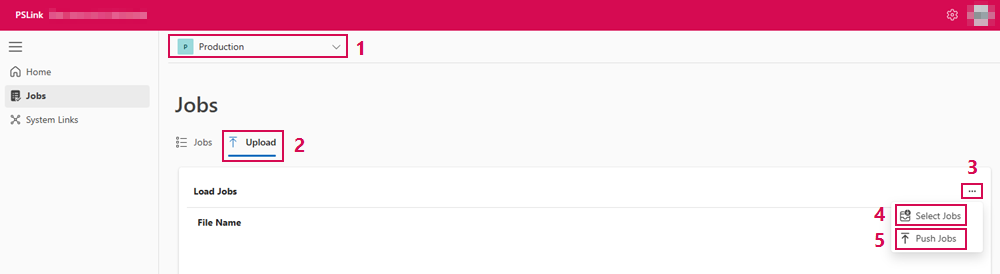
➢At the top of the interface, select the appropriate PSLink site. (1)
➢Click Upload. (2)
➢Open the context menu (...) on the right-hand side. (3)
➢Click Select Jobs. (4)
➢Browse to your integration job definition file and select it.
➢Click Push Jobs to upload the selected job to your site. (5)
After the job format has been validated, the uploaded job will appear in the Jobs tab of your site.