Delayed task highlighting
|
Configure Settings for Content Pages > TPG Scheduler Configuration > Delayed task highlighting |
This setting allows you to enable or disable the highlighting of delayed tasks in the Gantt chart.
When this option is enabled, tasks whose scheduled completion date has been exceeded are visually highlighted in the Gantt chart. This allows you to identify and monitor critical or overdue tasks more quickly.
➢Check the Enable highlight of delayed tasks checkbox. ▶ Delayed tasks are visually highlighted.
Optionally, you can specify a custom color for highlighting delayed tasks. This color replaces the default highlight color.
➢To do this, enter a valid color name or a hexadecimal value in the Custom color field, such as #0000FF or blue (depending on the supported color syntax).
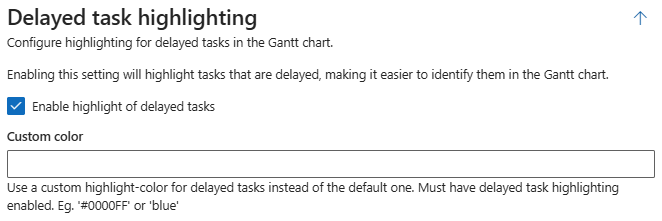
▶ Configuring a custom highlight color is only effective if the Enable highlight of delayed task option is selected.
Complete the configuration:
➢Click Submit at the very bottom to apply the settings.