Import MPP Configuration
|
Configure Settings for Content Pages > TPG Scheduler Configuration > Import MPP Configuration |
This setting determines how fields from imported Microsoft Project files (*.mpp) are transferred into PPP. This configuration is relevant when imported MPP values are to be used not only in the standard fields of the Bryntum task model, but also - or alternatively - in fields of the Dataverse table “Task.”
Field mapping is performed via Task field remappings. Each mapping consists of a source field, a destination field, and a specification of whether the value should be copied in addition or completely redirected.
▶ All required fields are marked with a red asterisk.
➢Click the down arrows on the right until you reach the Task field remappings section.
➢Click Add item. ▶ The input fields appear.
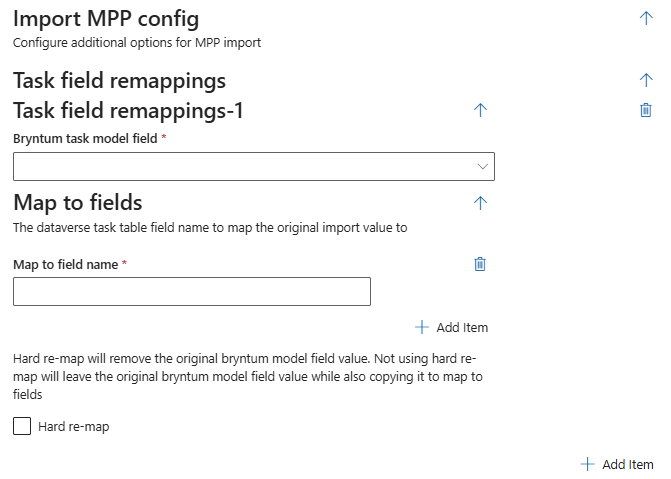
➢Bryntum task model field: Specifies the source field in the Bryntum task model whose value is used during the MPP import. Possible values include startDate, endDate, percentDone, effort, duration or manuallyScheduled.
➢Select the desired value from the drop-down menu.
▪Map to field name: Specifies the internal name of the target field in the Dataverse “Task” table into which the imported value will be written, tpg_start.
➢Enter the desired value in the field.
▪Hard re-map: Determines whether the value is additionally copied or completely redirected to the target field. If disabled, the value remains in the original Bryntum field and is also written to the destination field.
➢Uncheck the checkbox if you want the value to remain in the original Bryntum field and also be written to the destination field.
➢Check the checkbox if you want the destination field to replace the original Bryntum field.
Additional editing options:
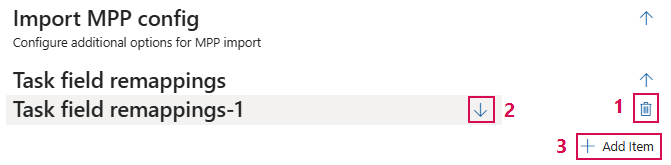
➢Click the Delete icon to delete a field. (1)
➢Click the up or down arrow to expand or collapse the desired column configuration. (2)
➢Click Add Item to add a field. (3)
Complete the configuration:
➢Click Submit at the very bottom to apply the settings.